HaYetsira St. 17, Yokneam, Israel
www.airtop-pc.com Page 20 of 25 Airtop owner’s manual
Installation and Service
Maintenance
Airtop requires no maintenance. You should not take Airtop apart other than opening the clamshell door and installing.
Taking Airtop apart will void its warranty.
For your convenience Airtop video available: https://www.youtube.com/watch?v=p7ANwEd14Wk
Access Airtop Motherboard
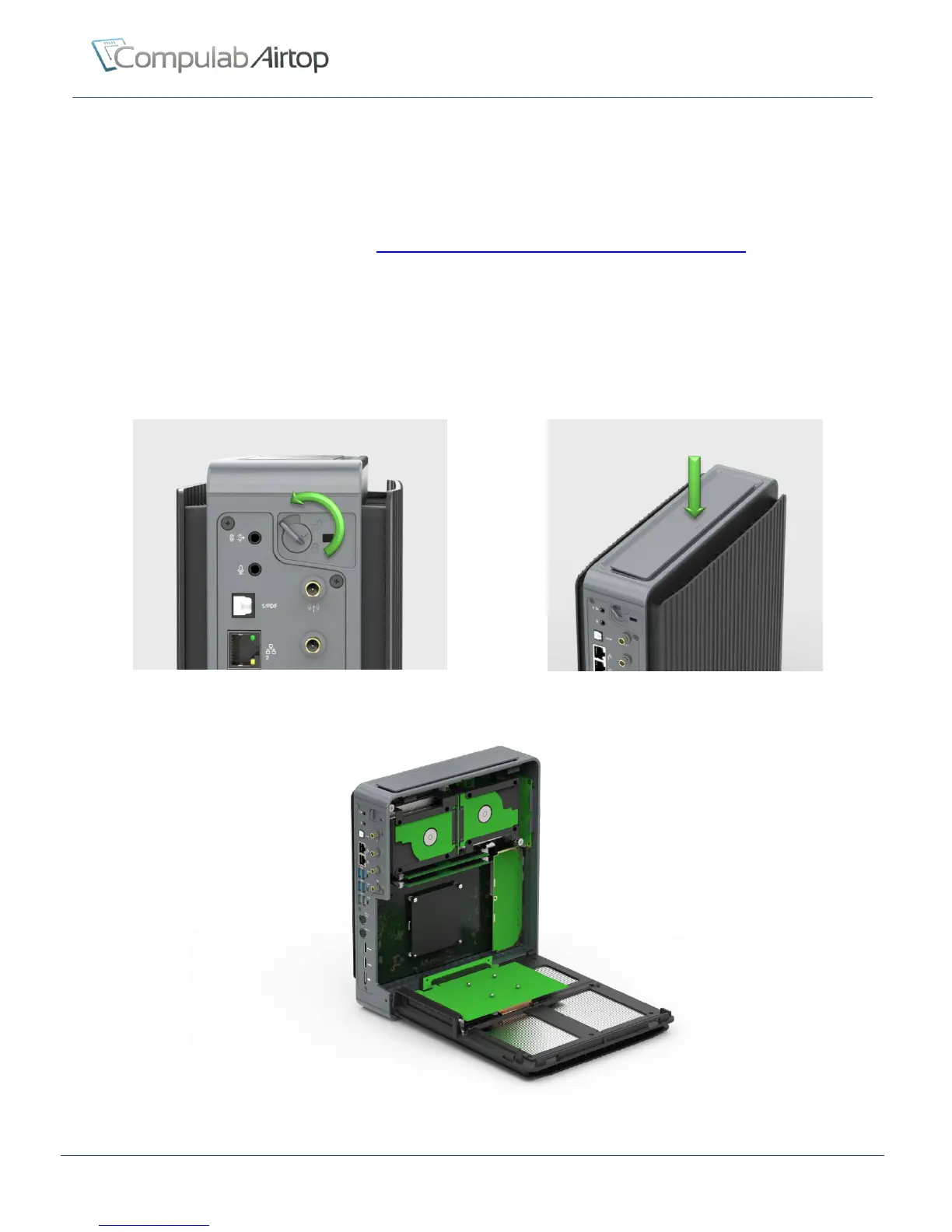
In order to access Airtop mother board follow the steps below:
1. Shut down the computer and disconnect PSU
2. Move locking knob on the rear panel to open position
3. Press the top-bar
4. Open the clamshell door
Figure 13 – Move locking knob to open position
Figure 14 – Press the top-bar
Figure 15 - Airtop from inside


 To Next Page