Home
Compuprint
Printer
9065
Page 129
Compuprint 9065 - Page 129
165 pages
Manual
Save Page as PDF
To Next Page
To Next Page
To Previous Page
To Previous Page
Loading...
6
6
.
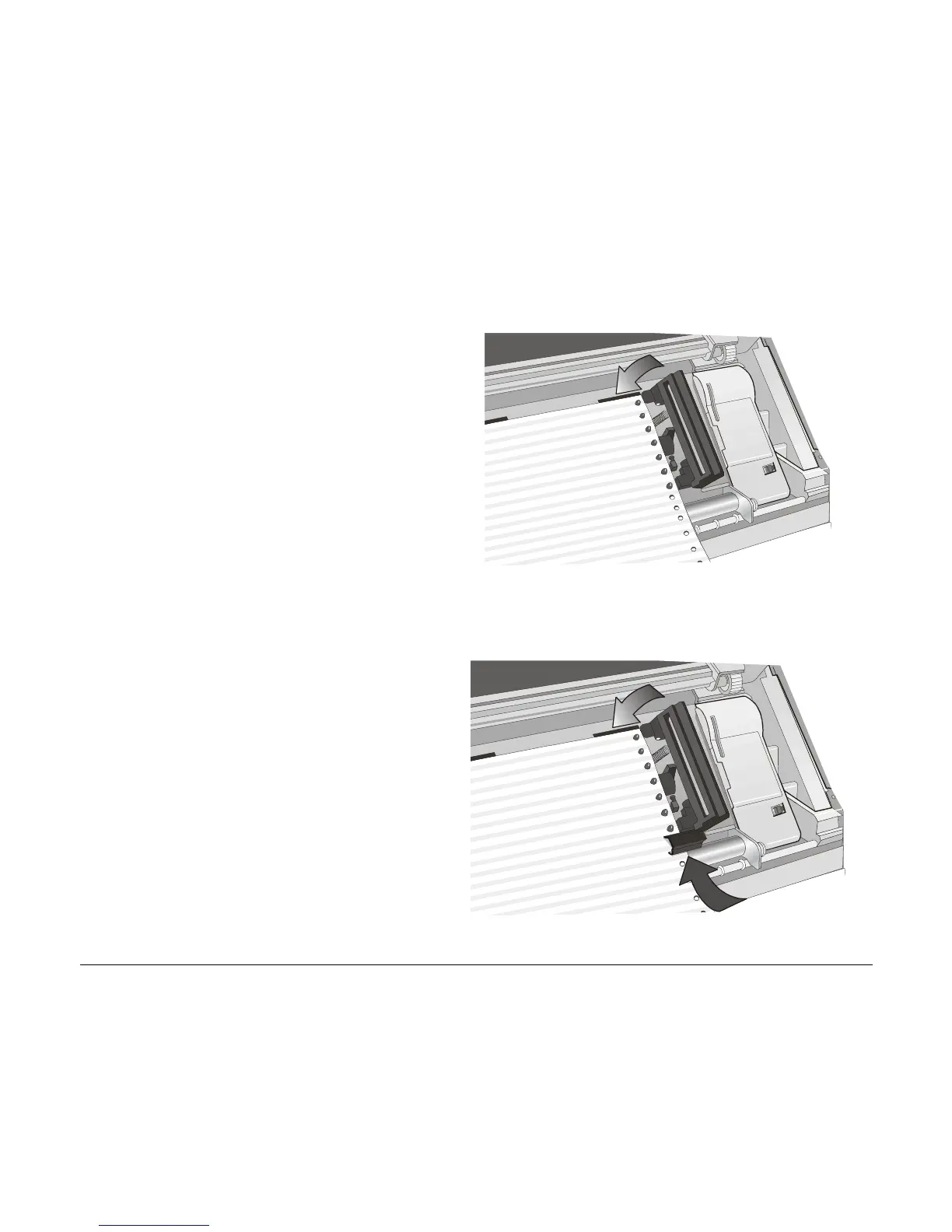
Insert the paper on the right sprocket
pins and close the right sprocket cover.
.
•
If you are using the
6 pin Front1 Push
tractor option, make sure the paper
goes under the paper sensor, and close
the right sprocket cover.
124
128
130
Table of Contents
Main Page
FFC Notes
4
Table of Contents
5
Table of Contents
6
EEC Regulations
6
Canadian D.O.C. Radio Interference Regulation IV
6
Getting to Know Your Printer
6
Printer Features (PRT9065)
6
Printer Features (PRT9080)
7
Unpacking Your Printer
8
Printer Parts
9
Front View
9
Rear View
10
Setting up Your Printer
11
Choosing a Suitable Location
11
Printer Assembly
12
Removal of the Shipment Locks
12
Ribbon Cartridge Installation
13
Host Computer Connection
18
Software Driver Selection
20
Power Connection
21
Selecting the Display Language
23
Configuring the Printer
24
Operator Panel Presentation
24
Display Messages
25
Off Line
25
Indicators
30
Function Keys
31
Key Combinations
35
Printer Setups
36
Entering the Printer Setups
36
Moving Within the Printer Setups
36
Leaving the Printer Setups
37
Power-On Configuration
38
Entering the Power-On Configuration
38
Program Setup
77
Entering the Program Setup
77
ANSI Emulation
102
How to Select the Paper Path
113
How to Use the Tear-Off Function
114
Selection of the Paper Size
114
Adjusting the Tear-Off Position
115
Selection of the Tear-Off Mode
116
How to Lock/Unlock the Printer Setups
117
How to Handle the Paper Parking
118
Paper Handling
123
Paper Paths
123
Paper Specifications
124
Fanfold Paper
124
Fanfold Paper Loading
125
Loading Paper Using the Front1 Push Tractor
125
Printer Maintenance and Troubleshooting
133
Cleaning the Printer
133
Replacing the Ribbon Cartridge
134
Printing the Self Test
136
Error Handling
137
Options
140
The Controller Board
140
Installing the Controller Board
140
The Front2 Push Tractor
144
Installing the Front2 Push Tractor
144
Removing the Front2 Push Tractor
147
Loading Paper Using the Front2 Push Tractor (Option)
148
Loading Paper Using the Front1 Push Tractor
154
When the Front2 Push Tractor (Option) Is
154
Installed
154
The Printer Pedestal
156
Printer Specifications
157
Other manuals for Compuprint 9065
Specifications
2 pages
Related product manuals
Compuprint SP40
72 pages
Compuprint 3056
75 pages
Compuprint 2056
2 pages



 To Next Page