Lock + Unlock for 3
seconds then Lock +
Unlock for 3 seconds
Hold Trunk
Button for 3
seconds
Lock + Unlock for 3
seconds then Lock +
Key for 3 seconds
Hold Trunk
Button for 3
seconds
Lock + Key for 3
seconds then Lock +
Unlock for 3 seconds
Hold Trunk
Button for 3
seconds
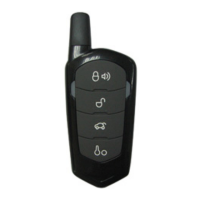
How to Program Options With 1 Way 4 Button Remotes
Wait for chirp
between each
tap
Scroll Through
Menu (Wait for
flash between
each tap)
Wait for corresponding parking light flash
and/or siren chirp before selecting option
Lock + Unlock for 3
seconds then Lock +
Unlock for 3 seconds
Hold Trunk +
Key for 3
seconds
Lock + Unlock for 3
seconds then Lock +
Key for 3 seconds
Hold Trunk +
Key for 3
seconds
Lock + Key for 3
seconds then Lock +
Unlock for 3 seconds
Hold Trunk +
Key for 3
seconds
STEP 2:
Scroll through menu waiting for 1 parking light flash and/or siren chirp per line.
STEP 3: Once finished scrolling through menu, wait for the parking lights and/or siren chirp to confirm
the option number. i.e. option 2-04 will flash and/or chirp 4 times. Select your option using the Lock,
Unlock, Trunk, or Start buttons.
Resetting to Factory Defaults:
To reset the options in a particular menu, enter the menu using your
remote. To reset options with a 2 Way remote tap the Trunk button 3 three times. To reset options with a
1 Way remote tap the Start button 3 times. Wait for parking lights to flash and/or siren chirp between
each tap. After the third tap, the menu will reset back to default. This must be done for each option menu
that must be reset.



 To Next Page