9 10
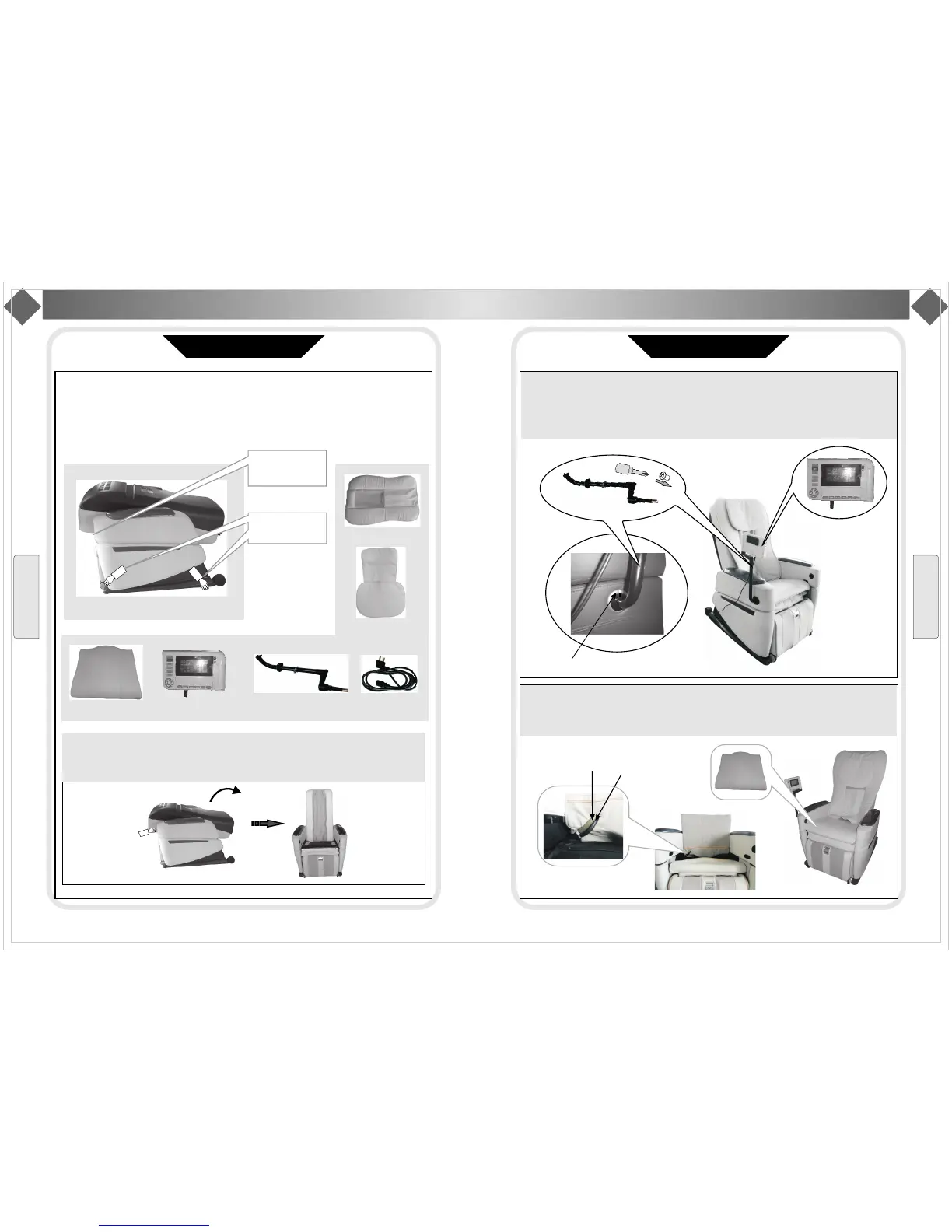
Step1 Take out the chair
Takeoutthesepadsfrompackingbox,chairbody,cushion,pillow,left/rightarmrests,
remotecontrolholder,cables,etc.Itneeds2peopletotakethechairbodyout.Hold
themetalframe(Pointout in below picture and take the main body out from
box slowly
)
.
Refertopictures()
Step2 Set the main body
Raisethebackto120degreeuntilyouheara click sound“ ” .
Mainbody
▲
Step4 Connect seat air pipe
Connect the air pipes in seat and those insert frame as per color (black to black gray with
gray brown with brown Then stick the snap fastener together
,
,). .
Step3 Install manual control holder and insert manual control
Using three screws (M5*15) to fix the manual control to right upper arm, then insert the
manual control into the bracket and fix the manual control cables to the buckle at the end of arm.
Align control holder and marking line.
control
VFD control
Seat cushion
Manual control holder
Cable
Back cushion
Pillow
Hold here to take out
Don t take this out
when you take out
the chair
'
I
n
s
t
a
l
l
a
t
i
o
n
I
n
s
t
a
l
la
ti
o
n
Installation
Installation
Installation(1)
Installation(2)
Control holder
Seatcushion
T
awny air pipe
Black air pipe


 To Next Page