06 Function details 07 Communication interface
09 Easy error diagnosis instructions
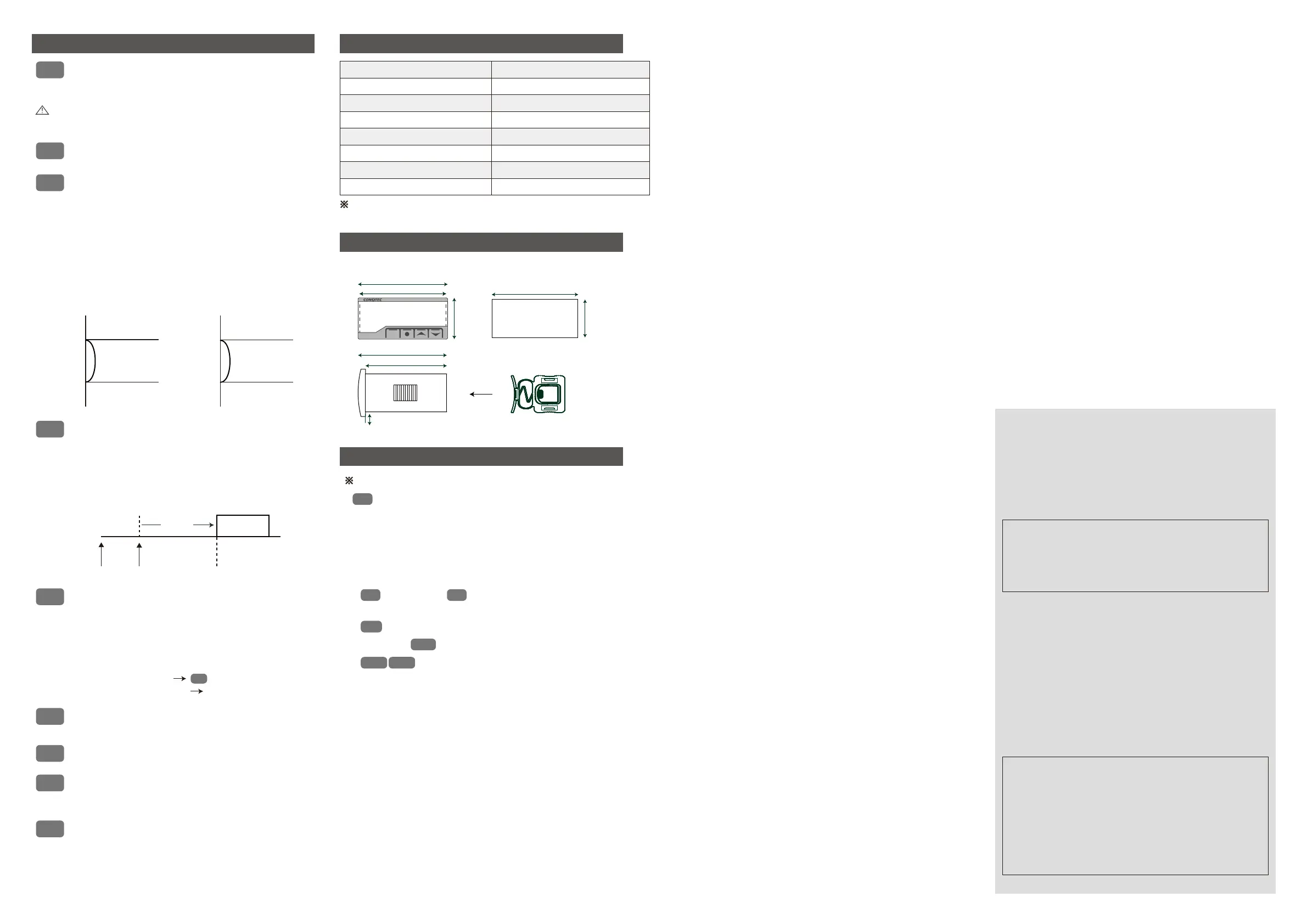
UNIT
: Change of the temperature unit
-
C (temperature displayed in Celsius)
-
F (temperature displayed in Fahrenheit)
: Output function option
- Cooling(
COOL) or Heating(HEAT)
TYP
dlt
COR
: Output delay time setting
: Correction of the current temperature
- Used to correct the current temperature based on the
reference temperature (e.g. mercury thermomrter,
existing thermometer, thermostat,etc.) when there is an
input error by an external sensor even though the product
Temperature
output
DlT
applied
(Current
temperature) 10.0℃
15.0℃15.0℃
Output
stopped
Dif
section
30
seconds
Note : If you change the UnIt while the product is running,
: Baudrate setting
- 1200BPS / 2400BPS / 4800BPS / 9600BPS / 19200BPS
BPS
: Communication data type setting
- Change the communication data format to Float type or Integer type.
- Float (
FL) and Integrer (IN) selections.
cdt
all the settings except for the UnIt will be initialized to
factory settings. Please reset all the settings.
- Different temperature is set to prevent such phenomenon
and protect relevant contacts.
dif
Set point OFF
Output ON
DIF : 5.0
25.0℃
20.0℃
< Cooling >
Output ON
Set point OFF
DIF : 5.0
20.0℃
15.0℃
< Heating >
- Ex1) Set temperature : 20.0℃,
typ : coOl, DIF : 5.0
- Ex2) Set temperature : 20.0℃,
typ : HEAT, DIF : 5.0
: Deviation temperature setting
- For on/off control, there should be a certain interval
between on and off.
- A relay or other output contacts may be quickly
damaged or experience hunting (electricity generation,
chattering,etc.) due to an external noise if the on/off
function is used too frequently.
- Used if the on/off function of a control target is used too
frequently (freezer,compressor,etc.)
- Protects running machine from momentary outage or
power re-connection.
- Ex) When is the output on for the following conditions:
set temperature (10.0℃); dit(00.30), dif(5.0℃)?
Displayed as 10.0
(current temperature modified)
Modification of 0.0 to -2.0
COR
- Ex) Actual temperature : 10.0℃
Display window : 12.0℃
itself does not have any problem.
: Communications address setting
aDDR
- An addres from 1 to 99 should be specified for RS485
communications
loc
: Locking of the setting
- Safety function intended to prevent anyone other than
- If set at
on : All the settings expect for the set temperature
will be locked.
- If set at
off : All the settings will be unlocked.
the main user from changing the settings
Applicable specification
Maximum units accessed
Communications method
Data speed
Communications range
Start Bit, Stop Bit
Parity Bit, Data Bit
Communications protocol
EIA RS485
32 units
(however, 1~99 available for address setting)
2-line half-duplex;Asynchronous
1200/2400/4800/9600/19200bps(5 options)
Within 1.2Km
Modbus
1Bit (fixed)
Parity Bit : None, Data Bit : 8Bit (fixed)
※ Please see the user manual on our website for more details about the
communications specifications..
71.0mm
SET
PANEL HOLE
66.5mm
61.0mm
4.0mm
29.0mm36.0mm
77.0mm
71.0mm
(Unit : mm / error : ±0.5)
•
•
o-e
If (open error) or
S-e
(short error) is displayed, there is
something wrong with a sensor. Please check the sensor.
•
o-k
If (OK) is displayed, settings have been saved.
•
lock
A text such as (lock) indicates that the product is in the lock mode.
•
•
Although this controller was designed to withstand a certain level
of external noise, it is not supposed to withstand all levels of noise.
Er1
: It is case where the product was subject to a strong external
noise and internal data memories have been damaged
In this case, contact us for product service.
※
If an error is displayed while the product is running
If the product is subject to a noise greater than 2KV,
(product name) is displayed, it refers to a model name.
zR10
If
•
z10
it could be internally damaged.
※ The above specifications may be changed without any notice
for performance enhancement. Please make yourself fully
familiar with and follow the above precautions.
■ Indoor uses only ■ Pollution class 2
※ An operating environment of this device is as follows.
◈ Operation precautions
■ Ambient temperature : 0 ~ 60℃ ■ Ambient humidity : 80%RH or less
■ Altitude under 2000m ■ Installation category : ll
◈ Installation precautions
•Product service : 070-7815-8289
•Customer service : 051-819-0425 ~ 0427
•Website : www.conotec.co.kr
•FAX : 051-819-4562
•SNS : Facebook, Instagram, Twitter, YouTube ▶ ‘Search for ‘Conotec’
•Email : conotec@conotec.co.kr
■ Major products and development
• Temperature/humidity controller
• Counter and timer controller
• Temperature/humidity indicator
• Current and voltage panel meter
• Oven controller
• PID controller
• CO2 controller
• Unit cooler controller
• Heat pump controller
• Thermo-hygrostat controller
• Chiller controller
• Short message alarm
• Smartphone app and
monitoring system
• Temperature/
humidity transmitter
※ This manual was prepared in the Naver Nanum fonts.
■ Warranty period: One year from the date of purchase
■ Address : (Street address) 56, Ballyongsandan 1-rp, Jangan-eup,
Gijang-gun, Busan, ROK
(Land-lot address) 901-1, Ballyong-ri, Jangan-eup,
Gijang-gun, Busan, ROK (46034)
■ Do not block the air outlet.
■ This device sholuld be connected to a protective earth terminal and a power
supply in order to prevent an electric shock.
■ This device should be laid out in a way that its power cord
is easy to handle.
the manufacturer may damage its protection function
■ Using this product in any method other than those specified by
08 Diemension and panel hole sizes


 To Previous Page
 Loading...