Wi-Fi
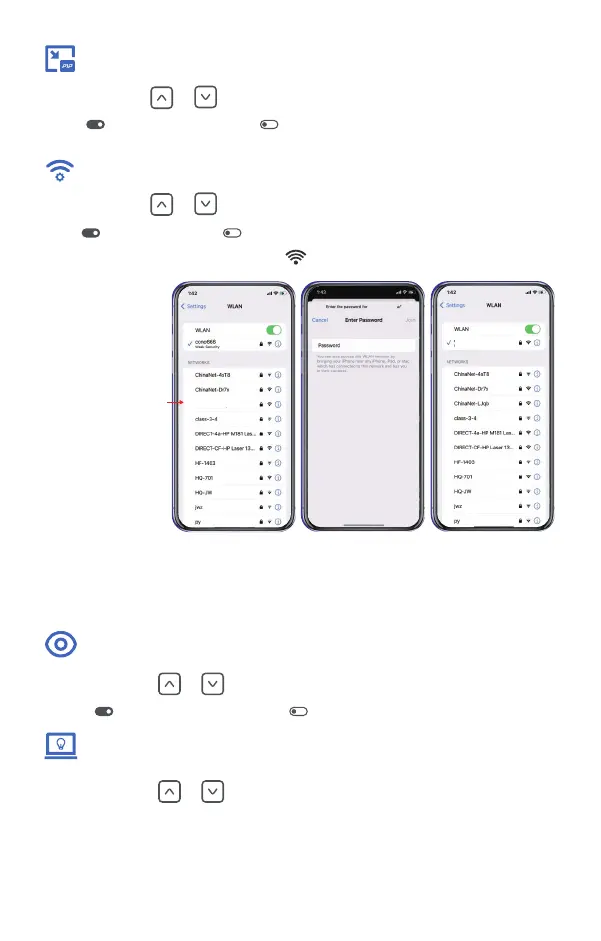
Wi-Fi status is shown in the display, means Wi-Fi is on.
11
Enter password:
12345678
After wait for 10s
Find WIFI named:
Tracer LRF ******
Tracer LRF ******
Tracer LRF ******
Tracer LRF ***
Short press or button to turn PIP mode On/Off.
means the PIP mode is on, means the PIP mode is off.
PIP
Short press or button to turn WiFi On/Off.
means the WiFi is on, means the WiFi is off.
Short press or button to turn Extreme Mode On/off.
means the Extreme mode is on, means the Extreme mode is off.
Extreme Mode
Short press or button to adjust the screen brightness from 1 to 10.
Screen Brightness
The default brightness is 5.


 To Next Page