GARAGE DOOR OPERATOR USER’S MANUAL
13
D
O
W
N
U
P
S
E
T
C
O
D
E
C
O
D
E
S
E
T
U
P
D
O
W
N
D
O
W
N
U
P
S
E
T
C
O
D
E
1 2
3 4
C
O
D
E
S
E
T
U
P
D
O
W
N
D
O
W
N
U
P
S
E
T
C
O
D
E
5
Increase force
Decrease force
Fig.17
Infrared photocell
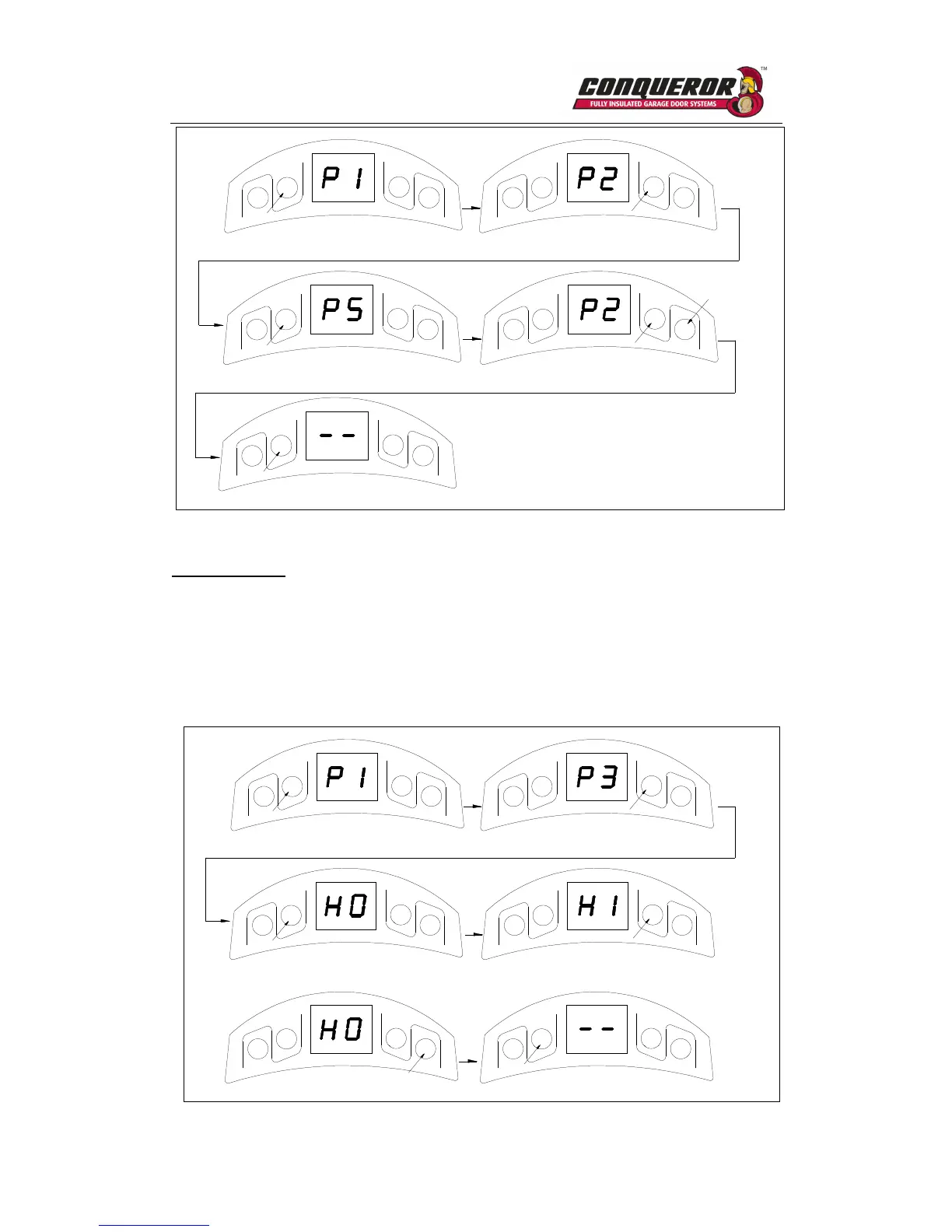
1. Press and hold SET four seconds until ‘P1’ is indicated on the LED display.
2. Press UP button twice until ‘P3’ is indicated on the LED display.
3. Press the SET. The factory preset is ‘H0’.
4. Press UP (‘H1’ will display) to enable the photocell. Press DOWN (‘H0’ will display) to
disable the photocell.
5. Press SET to confirm the setting.
D
O
W
N
U
P
S
E
T
C
O
D
E
C
O
D
E
S
E
T
U
P
D
O
W
N
D
O
W
N
U
P
S
E
T
C
O
D
E
1 2
3 4a
C
O
D
E
S
E
T
U
P
D
O
W
N
D
O
W
N
U
P
S
E
T
C
O
D
E
4b
Photocell enable
5
C
O
D
E
S
E
T
U
P
D
O
W
N
Photocell disable
Fig.18



 To Next Page