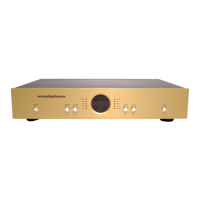
Conrad-Johnson ET3 Preamplifier Owner’s Manual
Controls
<power>: Press the switch labeled power to switch the
preamplifier on. A time delay auto-muting circuit is incorporated
into the ET3 to suppress turn-on/turn-off transients. All outputs are
grounded via relays for approximately 90 seconds after the unit is
turned on in order to suppress warm-up transient noises. During
auto-muting, the mute indicator led will flash. Level and balance
control functions are disabled during the auto-muting cycle. The
muting relay also grounds the outputs immediately at turn-off or in
the event of any power line interruption.
When first connected to ac mains, or after an interruption of power,
the ET3 will turn on in a default mode (after auto-muting), with the
level set at 20, and the CD input selected. In subsequent sessions,
as long as the ac mains has not suffered a power outage, the unit
will turn on at the last used volume setting and input.
<mute>: Pressing the mute button will silence the preamplifier
main outputs, and set the level display to zero on both channels.
Pressing the mute button again will restore the previously selected
level setting.
<vol up>, <vol down>: Level setting on the ET3 can be adjusted
in approximately 0.7 dB increments. The level setting can be
changed by pressing the vol up and vol down buttons on the front
panel. Each time a button is pressed, the level will move up or
down 0.7 dB. If a button is pressed and held, the level control will
cycle through the steps at an accelerating rate.
<source>: Pressing the button labeled source will cause the unit
to step through the five source inputs (ph/aux, tuner, cd, video,
aux2). The selected input will be indicated by an illuminated led.
<epl/thtr>: Pressing the epl/thtr button will cause the unit to step
from source through epl1 and theater. When source is selected,
the input selected by the source selector will be passed directly to
the volume control. When the EPL1 or THEATER inputs are
selected, the selected source will first pass through the external
processor loop before being routed to the volume control. When
THEATER is selected, the level will be set and locked to unity gain.


 To Next Page
 Loading...