4
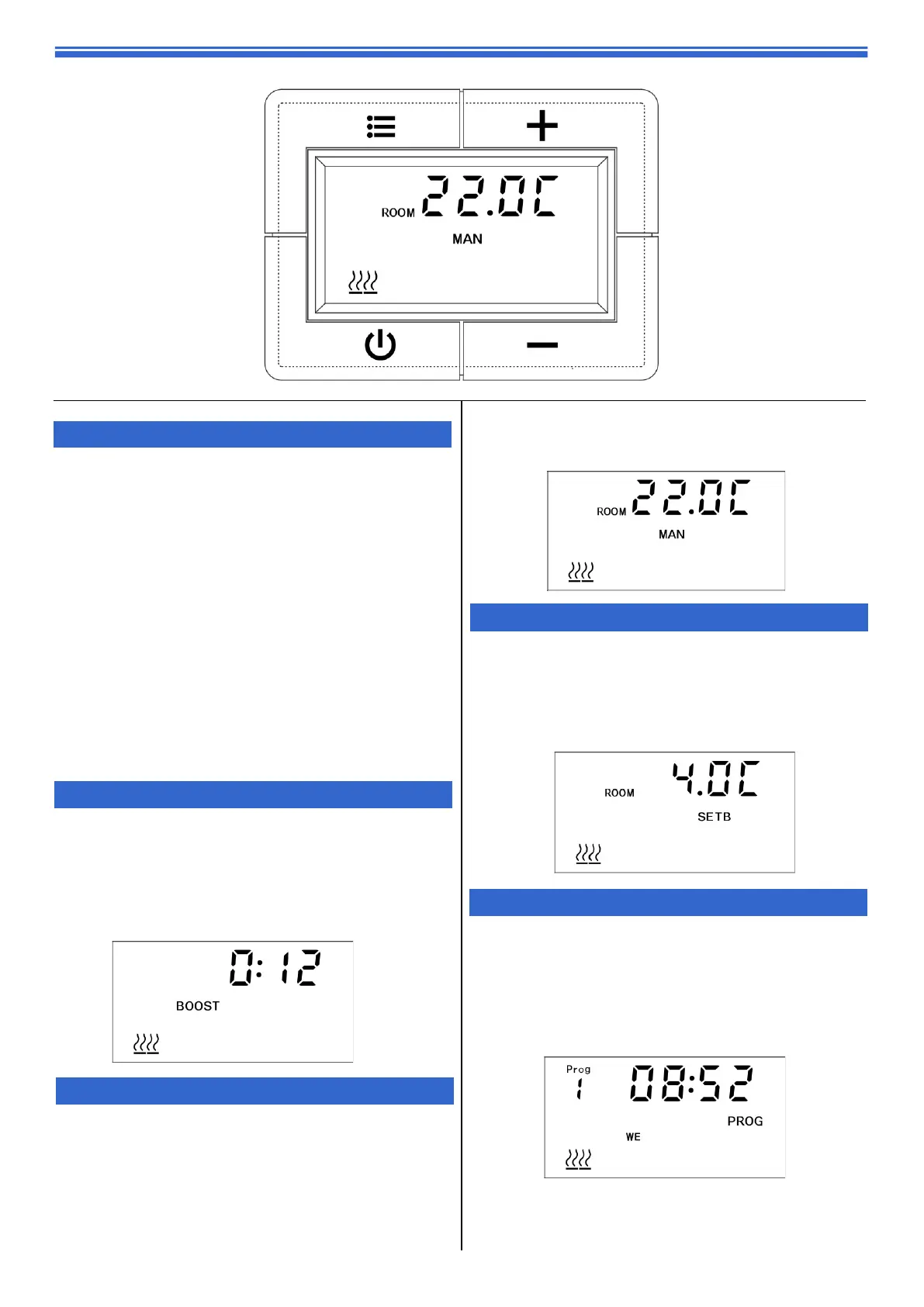
The PLE has 4 standard operating modes:
BOOST, MANUAL, SETB and PROG.
Each mode can be selected by pressing the MENU
button to cycle through the options. The cycle sequence
will always start with BOOST mode followed by MANUAL,
SETB and PROG.
The PLE also has a STANDBY MODE. To enter/exit this
mode, press the standby button. In STANDBY MODE, the
heating will not be activated.
To adjust the operating mode/settings of the PLE, the
display must first be activated.
If the controller is in STANDBY MODE, press the power
button. The heater will exit standby mode and the
display will be activated for 5 seconds.
If the controller is not in STANDBY MODE, press any of the
+ or - or menu buttons once. The display will be activated
for 5 seconds.
MODE/MENU INCREASE VALUE
STANDBY DECREASE VALUE
1. Basic Operation
3. MAN - Manual Mode
In MANUAL mode, the heater maintains a chosen set
temperature between 15°C and 35°C. To amend the
set temperature when in MANUAL mode, activate the
display and use the + and - buttons to change the
temperature. Once the temperature is set, you can
leave the display to return to the main screen and the
settings will be saved.
2. BOOST - 15 minutes
The boost feature increases the room temperature for 15
minutes. To amend the set temperature when in BOOST
mode, activate the display and use the + and - buttons
to change the temperature. Once the temperature is set,
you can leave the display to return to the main screen
and the settings will be saved. After 15 minutes, the PLE
will return to the previous operating mode.
4. SETB - Setback Mode
5. PROG - Automatic time mode
In this mode, the heater will follow the week’s time / tem-
perature program.
The temperature can be temporarily overridden in
PROG
mode by simply activating the display and using the
+
and
-
buttons to set the new temperature. The new set
temperature will be then maintained until the next pro-
gram step.
When the room temperature reaches the set
temperature, the heating is disabled.
In SETB mode, the heater maintains a chosen set
temperature between 4°C and 15°C. To amend the set
temperature when in SETB mode, activate the display
and use the + and - buttons to change the temperature.
Once the temperature is set, you can leave the display
to return to the main screen and the settings will be
saved.


 To Next Page
 Loading...