Childproof lock en
33
2.
Select any ongoing cooking setting.
a The display goes out.
7 Childproof lock
You can use the childproof lock to prevent children
from switching on the hob.
7.1 Activating the childproof lock
Requirement:The hob is switched off.
▶
Press and hold for approx. 4seconds.
a The indicator above lights up for 10seconds.
a The hob is locked.
7.2 Deactivating the childproof lock
▶
Press and hold for approx. 4seconds.
a The lock is released.
7.3 Automatic childproof lock
This function automatically activates the childproof lock
when you switch off the hob.
"The automatic childproof lock can be activated in the
basic settings." →Page34
8 Time-setting options
Your appliance has different time-setting options which
can be used to set a cooking time, an automatic timer
or a kitchen timer.
8.1 Cooking time
Enter a cooking time for the relevant hotplate. When
the cooking time has elapsed, the hotplate switches off
automatically.
You can set a cooking time of up to 99 minutes.
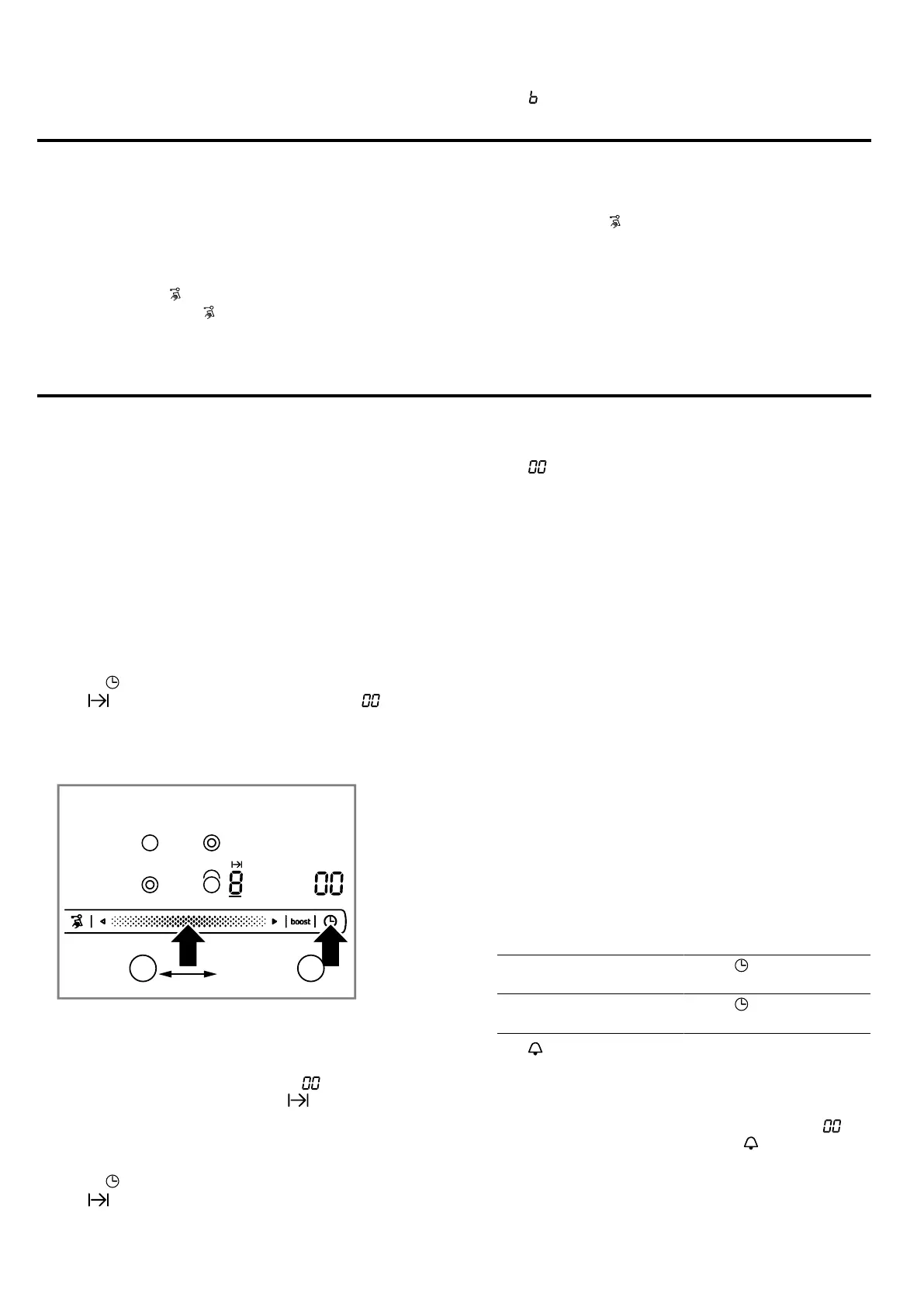
Setting the cooking time
Requirement:The hotplate is selected.
1.
Select the heat setting.
2.
Touch .
a The indicator for the hotplate lights up. lights
up on the timer display.
3.
Within the next 10seconds slide your finger along
the control panel until the required cooking time is
reached.
a The cooking time counts down. If you have set a
cooking time for more than one hotplate, the cook-
ing time of the hotplate selected is displayed.
a When the cooking time has elapsed, the hotplate
switches off. A signal sounds and lights up on
the display for 10seconds. The display lights up
brightly.
Changing or cancelling the cooking time
1.
Select the hotplate.
2.
Touch .
a The display lights up brightly.
3.
On the control panel change the cooking time or set
it to .
Switching off the continuous signal
You can switch the signal off manually.
▶
Touch any symbol.
a The displays will go out and the audible signal will
stop.
Automatic timer
You can use this function to preselect a cooking time
for all hotplates. Each time a hotplate is switched on,
the preselected cooking time counts down. When the
cooking time has elapsed, the hotplate switches off
automatically.
"Switch on the automatic timer in the basic settings."
→Page34
Tip:"You can reduce or delete the cooking time for in-
dividual hotplates." →Page33
8.2 Kitchen timer
You can set a time of up to 99 minutes after which a
signal will then sound. The kitchen timer runs inde-
pendently of all other settings.
Setting the kitchen timer
1.
Switch on the kitchen timer.
There are 2 different ways to switch the kitchen
timer on.
If a hotplate has been
selected.
Touch twice within
10seconds.
If a hotplate has not
been selected.
Touch .
a The indicator lights up.
2.
Within the next 10seconds set the required time on
the control panel.
a The time counts down.
a When the time has elapsed, a signal sounds.
lights up on the timer display. The indicator for
the kitchen timer lights up brightly. It switches off
after 10seconds.



 To Next Page