EasyManua.ls Logo

Contax Aria - Page 48

Contax Aria
114 pages
Print Icon
To Next Page IconTo Next Page
To Previous Page IconTo Previous Page
Loading...
104
1
Set
the
lens
to
its
minimum
aperture
(in
green)
and
set
the
exposure
mode
selector
lever
to
“P.”
2
Compose
your
picture
and
shoot.
The
camera
will
automatically
select
the
optimum
combination
of
aperture
and
shutter
speed
to
suit
your
subject,
and
the
selected
aperture
and
shutter
speed
will
be
displayed
in
the
viewfinder.
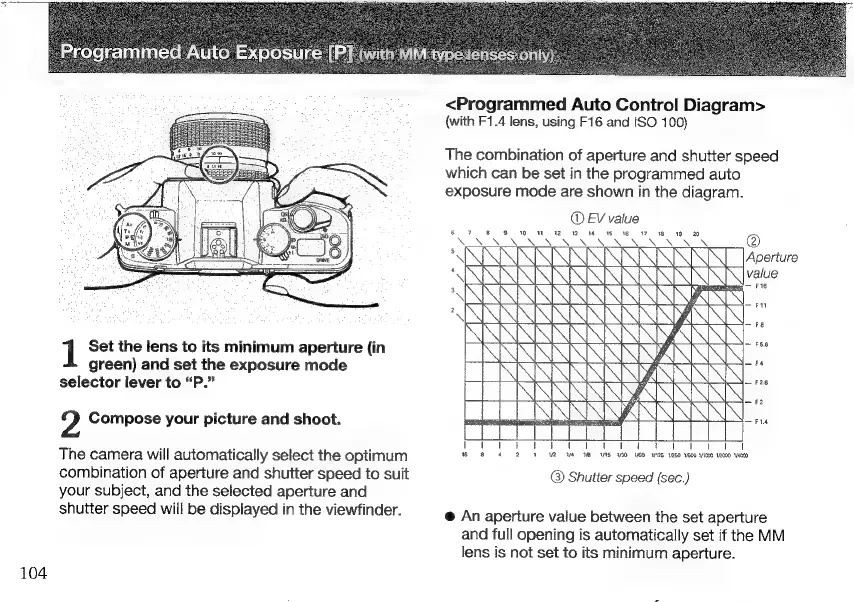
<Programmed
Auto
Control
Diagram>
(with
F1.4
lens,
using
F16
and
ISO
100)
The
combination
of
aperture
and
shutter
speed
which
can
be
set
in
the
programmed
auto
exposure
mode
are
shown
in
the
diagram.
(D
EV
value
6
7
8 9
ON
V n
M
ae
v
w
w
RN SR
ROR
ERS
REN
RER
NS
NUN
V
©
Aperture
value
FG
Fu
E
de
R
Fa
ECKER
Ex
1
Ed
1
2
Wa
18
INS 130 VEO
1125
1/250
1500
VI000
1/2000
14000
©
Shutter
speed
(sec.)
e
An
aperture
value
between
the
set
aperture
and
full
opening
is
automatically
set
if
the
MM
lens
is
not
set
to
its
minimum
aperture.

Other manuals for Contax Aria

Related product manuals