EasyManua.ls Logo

Contax Aria - Page 81

Contax Aria
114 pages
Print Icon
To Next Page IconTo Next Page
To Previous Page IconTo Previous Page
Loading...
174
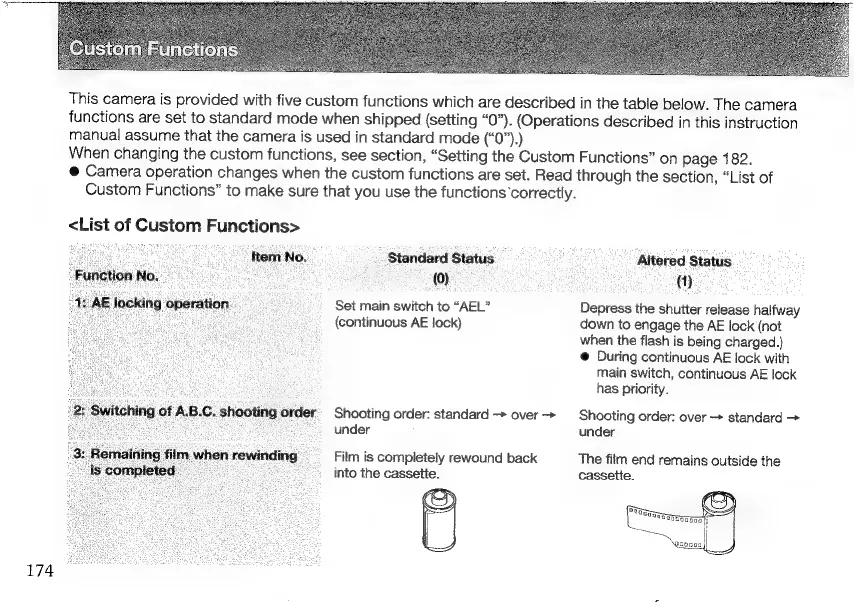
This
camera
is
provided
with
five
custom
functions
which
are
described
in
the
table
below.
The
camera
functions
are
set
to
standard
mode
when
shipped
(setting
“0”).
(Operations
described
in
this
instruction
manual
assume
that
the
camera
is
used
in
standard
mode
CO)
When
changing
the
custom
functions,
see
section,
“Setting
the
Custom
Functions”
on
page
182.
@
Camera
operation
changes
when
the
custom
functions
are
set.
Read
through
the
section,
“List
of
Custom
Functions”
to
make
sure
that
you
use
the
functions
correctly.
<List
of
Custom
Functions>
`
tem
No.
Standard
Status
-
Altered
Status
;
;
`
(0)
:
(1)
Set
main
switch
to
“AEL”
Depress
the
shutter
release
halfway
(continuous
AE
Jock)
down
to
engage
the
AE
lock
(not
when
the
flash
is
being
charged.)
@
During
continuous
AE
lock
with
main
switch,
continuous
AE
lock
has
priority.
)
operation
Shooting
order:
standard
over
>
Shooting
order:
over
standard
>
under
under
Film
is
completely
rewound
back
The
film
end
remains
outside
the
into
the
cassette.
cassette.

Other manuals for Contax Aria

Related product manuals