EasyManua.ls Logo

Contax Aria - Page 83

Contax Aria
114 pages
Print Icon
To Next Page IconTo Next Page
To Previous Page IconTo Previous Page
Loading...
182
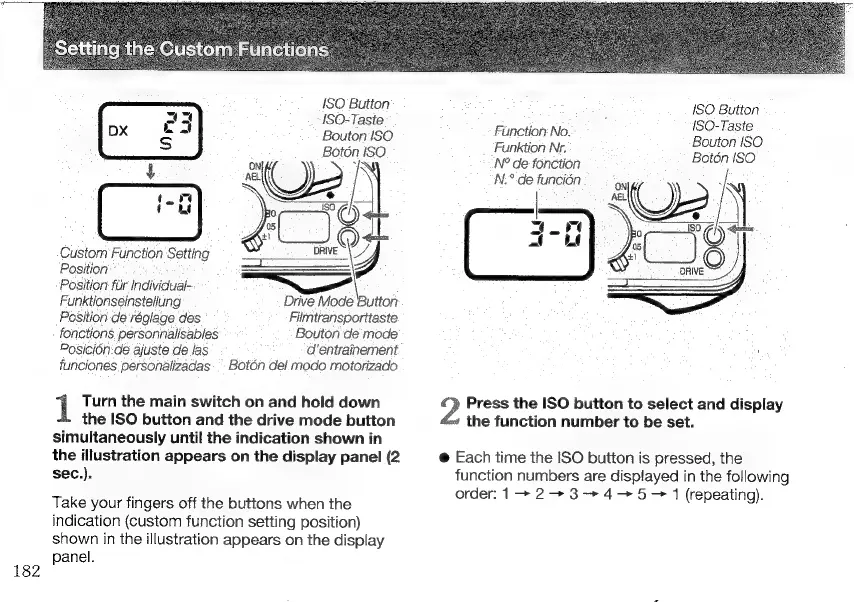
ISO
Button
ISO-Taste
Bouton
ISO
Boton
ISO
Ea
(
2
-
ui
`
Jo
y)
Custom
Function
Setting
Position’
Position
für
Individual-
Funktionseinstellung
Drive
Mode
Button
Position
de
réglage
des
Filmtransporttaste
fonctions
personnalisables
Bouton
de
mode
d’entrainement
Posición.
de
ajuste
de
las
funciones
personalizadas
`
Botón
del
modo
motorizado
Turn
the
main
switch
on
and
hold
down
the
ISO
button
and
the
drive
mode
button
simultaneously
until
the
indication
shown
in
the
illustration
appears
on
the
display
panel
(2
sec.).
Take
your
fingers
off
the
buttons
when
the
indication
(custom
function
setting
position)
shown
in
the
illustration
appears
on
the
display
panel.
ISO
Button
i
ISO-Taste
Function
No.
í
Bouton
ISO
Funktion
Nr.
Botón
ISO
N?
de
fonction
N.?
de
función
$
9
N
IT
e
DRIVE
+}
?
Press
the
ISO
button
to
select
and
display
the
function
number
to
be
set.
@
Each
time
the
ISO
button
is
pressed,
the
function
numbers
are
displayed
in
the
following
order:
1
2
>
8
4
5
>
1
(repeating).

Other manuals for Contax Aria

Related product manuals