EasyManua.ls Logo

Continental Refrigerator TR7412UB-OR - User Manual

Continental Refrigerator TR7412UB-OR
10 pages
Print Icon
To Next Page IconTo Next Page
Loading...
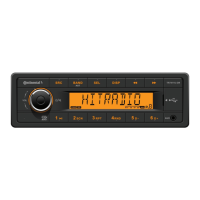
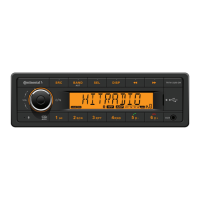
TR7412UB-OR
RADIO / USB MP3 / WMA / Bluetooth
®
12V
OWNER’S MANUAL
TR7412UB-OR_EN.indd 1 28/05/15 15:50

Questions and Answers

  • M
    Michael FischerJul 30, 2025
    How to fix a Continental Refrigerator TR7412UB-OR that won't switch on?
    • M
      Melissa HurleyJul 30, 2025
      If your Continental Refrigerator Car Receiver won't switch on, first, ensure your car ignition is on. Next, check the cable connection to make sure it's properly connected. Finally, if the issue persists, replace the fuse with a new one of the same capacity.
  • S
    Steven ArnoldAug 4, 2025
    Why is there no sound coming from my Continental Refrigerator Car Receiver?
    • L
      Linda WolfeAug 4, 2025
      If you're not getting any sound from your Continental Refrigerator Car Receiver, the volume might be set to the minimum, or the mute function could be activated. Check the volume level and switch the mute function off.
  • N
    Nancy SmithAug 8, 2025
    Why is the radio reception quality so poor on my Continental Refrigerator Car Receiver?
    • D
      dana69Aug 8, 2025
      If your Continental Refrigerator Car Receiver is showing poor quality reception of a radio station, it might be because the antenna is not fully extended or is broken. Fully extend the antenna, and if it's broken, replace it with a new one.
  • B
    Beth AlvarezAug 12, 2025
    What to do if the screen of my Continental Refrigerator TR7412UB-OR Car Receiver does not work normally?
    • A
      Amber AdamsAug 12, 2025
      If your Continental Refrigerator Car Receiver unit or screen isn't working normally, the system might be unstable. Try pressing the RESET button to resolve this.
  • E
    erica77Aug 17, 2025
    Why am I unable to receive stations on my Continental Refrigerator Car Receiver?
    • G
      gonzalesfrederickAug 17, 2025
      If you are unable to receive stations on your Continental Refrigerator Car Receiver, the antenna is probably not connected properly. Ensure the antenna is correctly connected.
  • R
    rgonzalezAug 21, 2025
    What to do if I am unable to insert a USB device into my Continental Refrigerator TR7412UB-OR?
    • E
      Erika HarrisAug 21, 2025
      If you can't insert a USB device into your Continental Refrigerator Car Receiver, it might be because the USB device has been inserted the wrong way. Try inserting it the other way around.
  • N
    Nicholas ReidAug 25, 2025
    Why can't my Continental Refrigerator TR7412UB-OR read the USB device?
    • L
      Laura GreerAug 26, 2025
      If your Continental Refrigerator Car Receiver can't read the USB device, it might be because the NTFS format is not supported. Make sure the file system is in FAT or FAT32 format. Note that due to different formats, some models of storage devices or MP3 players may not be readable.

Summary

Safety Information and Precautions

General Safety Precautions

Important warnings and precautions for operating the device safely, including electrical system and environmental considerations.

Operational Cautions

Specific warnings regarding volume levels, complex operations, and handling potential hazards like electrical shock.

Panel Controls Overview

Button Functionality Guide

System Setting Item List

Bluetooth Functions

USB Function Summary

USB Device Handling

Instructions for connecting and disconnecting USB storage devices to the unit.

Electrical Connections

ISO Connector Pinout

Diagram and list of pin assignments for the ISO electrical connector.

Troubleshooting Common Issues

General Unit Problems

Solutions for issues like the unit not switching on, no sound, or abnormal screen behavior.

Tuner and USB Mode Problems

Troubleshooting for radio reception issues and problems with USB device insertion or reading.

Continental Refrigerator TR7412UB-OR Specifications

General IconGeneral
BrandContinental Refrigerator
ModelTR7412UB-OR
CategoryCar Receiver
LanguageEnglish

Related product manuals