9
Color Temperature
Adjust the color personality of the picture to your preference.
Normal - Gives the white colors a neutral tint.
Warm - Gives the white colors a reddish tint.
Cool - Gives the white colors a bluish tint.
Sound Mode
Note:The bass, treble and balance are only available in User mode, you can adjust
as you like.
Bass
Increases or decreases lower-pitched sounds.
Press ◄ / ► button to adjust.
Treble
Increases or decreases high-pitched sounds.
Press ◄ / ► button to adjust.
Balance
Adjust the balance between left and right speakers to adapt to your listening position.
Press ◄ / ► button to adjust.
TV Operation and System Setup
Sound Mode
Treble
Bass
Balance
MTS
Audio Language
Digital Audio Output
Surround Sound
AVL
TV Speaker
Standard On
Select SelectMove MoveEXIT EXITMENU MENU
Stereo
English
PCM
Off
Off
50
50
0
Time TimeSetup SetupParental ParentalChannel Channel
12 12
6 6
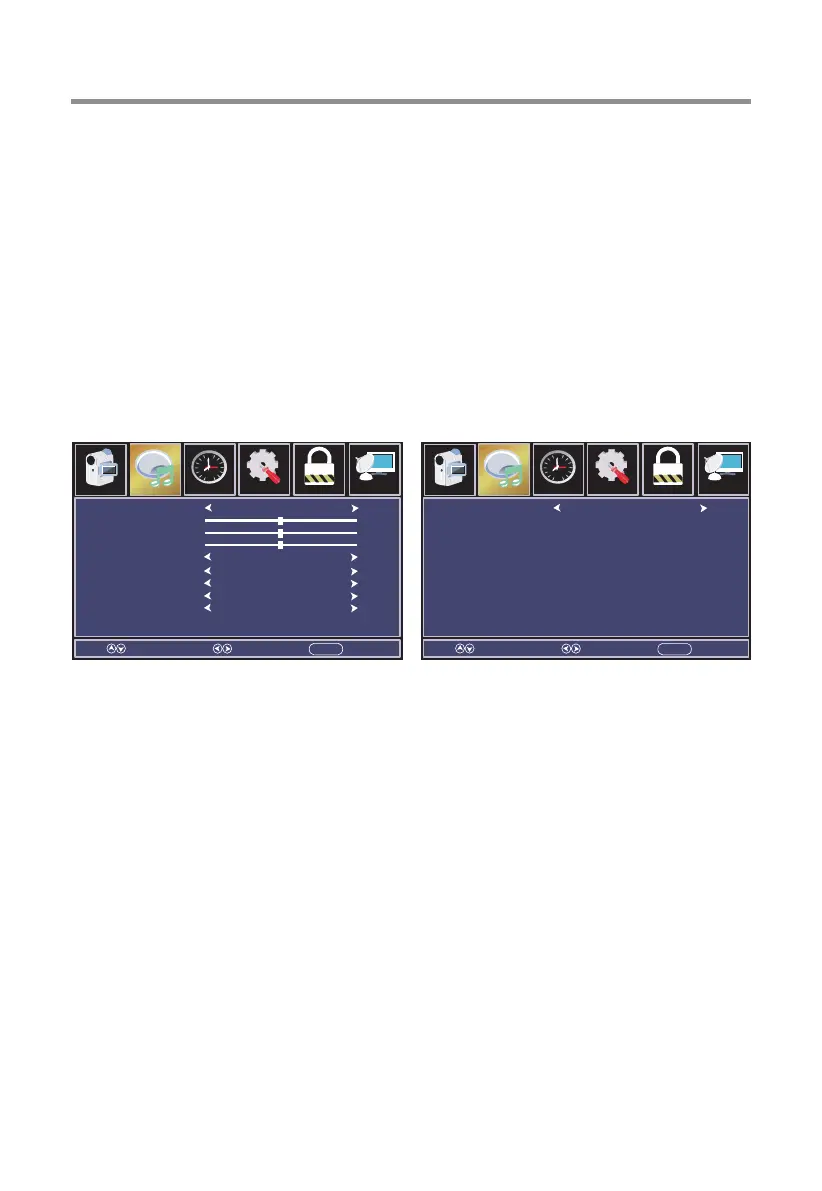
Audio Menu
Press MENU button to display the main menu, press ◄ / ► button to select Audio.
Press ▼/▲ button to select submenu.
Press ◄ / ► button to adjust options.
Press MENU button to back the previous menu.
Picture Picture
Audio Audio
Select a sound mode to achieve ideal sound.
Press ◄ / ► button to select (Standard / User / Movie / Sports / Music).


 To Next Page