7
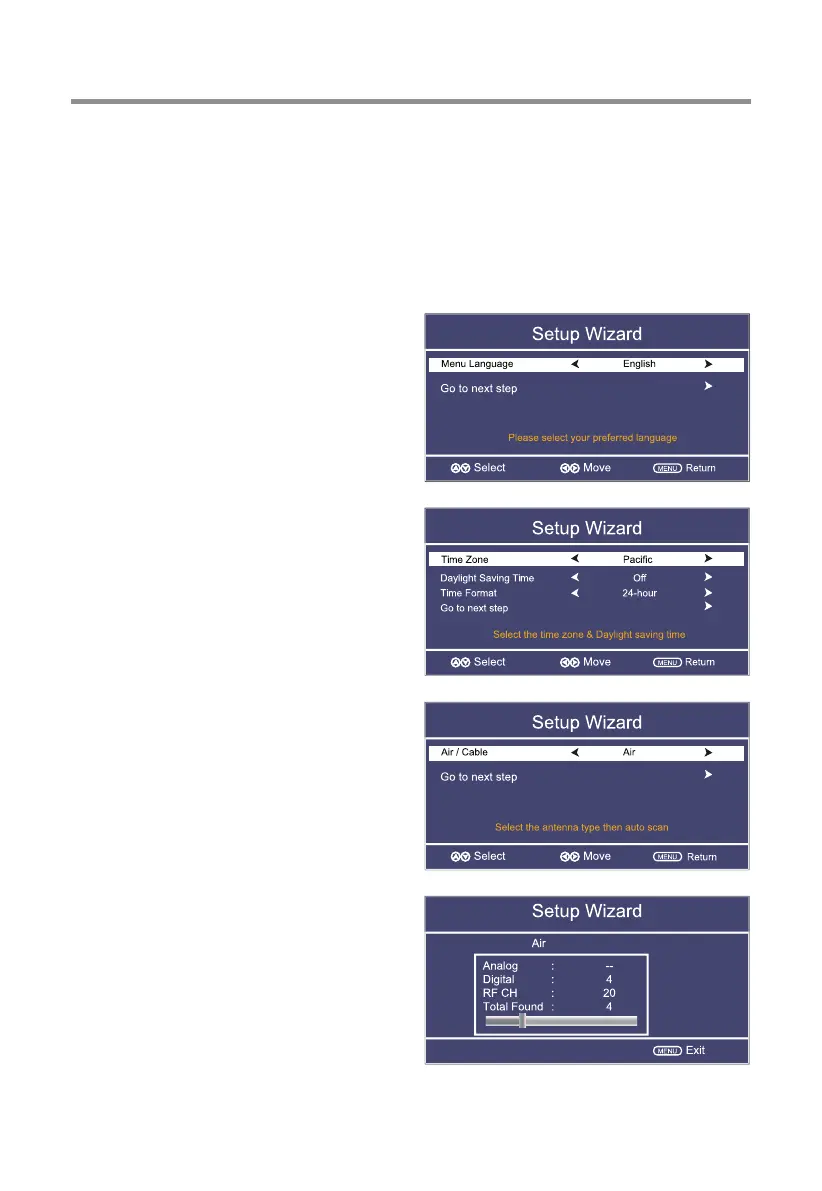
Initial Setup Wizard
After connecting your TV antenna or cable wire, turn the television ON. The quick
setup wizard will display on-screen. Select your preferred Picture setting followed by
antenna options if you will view local over-the-air TV broadcasts from an antenna.
These channels will be stored in the TV tuner memory after performing Channel Auto
Scan.
Select Language
Press ◄/► button to select the language
to be used for menus and message.
Press ▼/▲ button to select go to next
step and press OK/► button to go.
Select Time
Press ▼/▲ button to select the time
zone, daylight saving time and time
format you want.
Press ◄/► button on the remote control
to adjust.
Press ▼/▲ button on the remote control
to select go to next step and press OK/►
button to go.
Auto Scan
Press◄/►button to select the antenna
type.
Press▼/▲button t
o select go to next
step.
Press OK/► button to start auto scan.
Channels found will be stored into the
TV tuner memory.
TV Operation and System Setup


 To Next Page