6
Getting Started
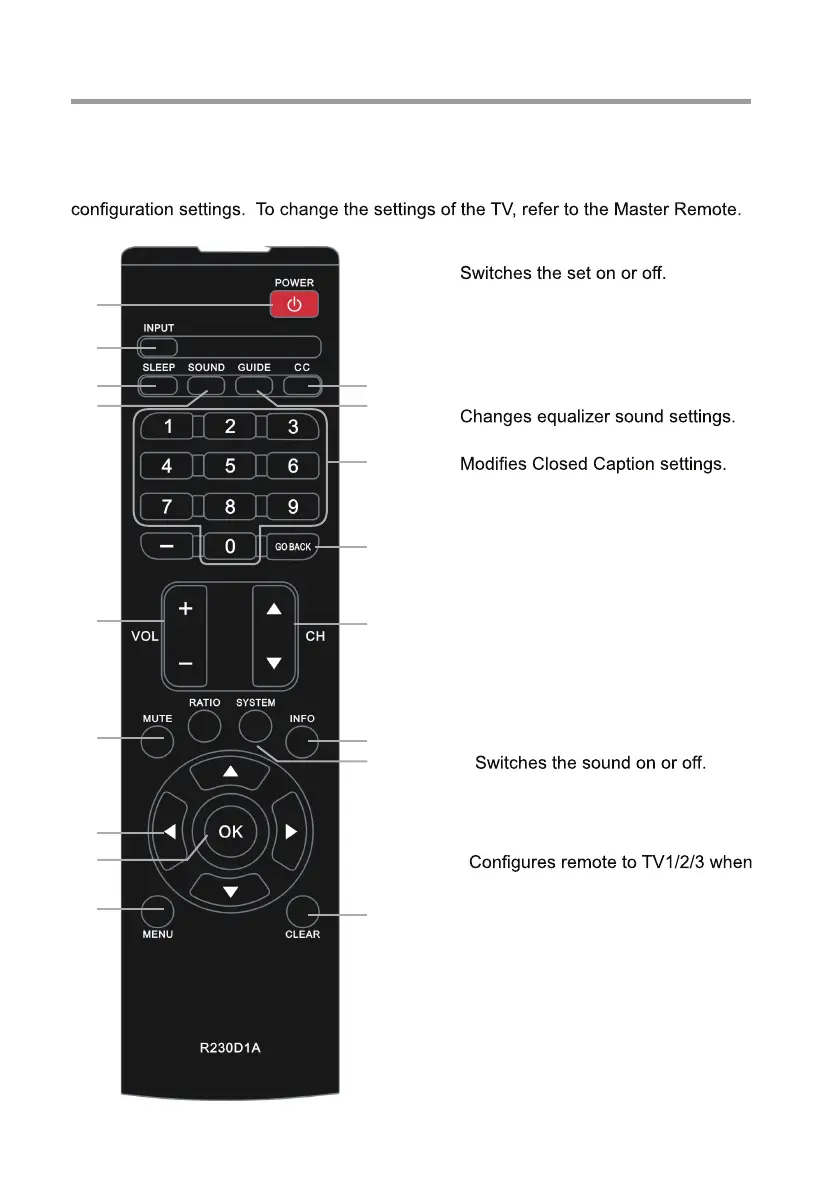
The Guest Remote Control - R230D1A
7. NUMBER BUTTONS
Selects channel numbers.
1. POWER
13. SYSTEM
multiple TVs are in the same room.
4. SOUND
3. SLEEP
Sets the sleep timer.
6. GUIDE
Displays a channel list menu.
8. GO BACK
Return to the previous channel.
5. CC
10. VOL+/VOL-
Adjusts sound level.
9. CH+/CH-
Changes the channel.
11. MUTE
2. INPUT
Selects the input source.
16. MENU
Displays the Guest Menu.
14. Navigational Controls
Adjusts or selects menu settings.
15. OK
Accepts your selection.
12. INFO
Displays the current channel info.
17. CLEAR
Exits from any OSD.
This remote is used by the hotel guest. It prevents the guest from changing
1
2
3
4
5
6
10
11
14
15
16
7
8
9
12
13
17


 To Next Page