18
TV Operation and System Setup
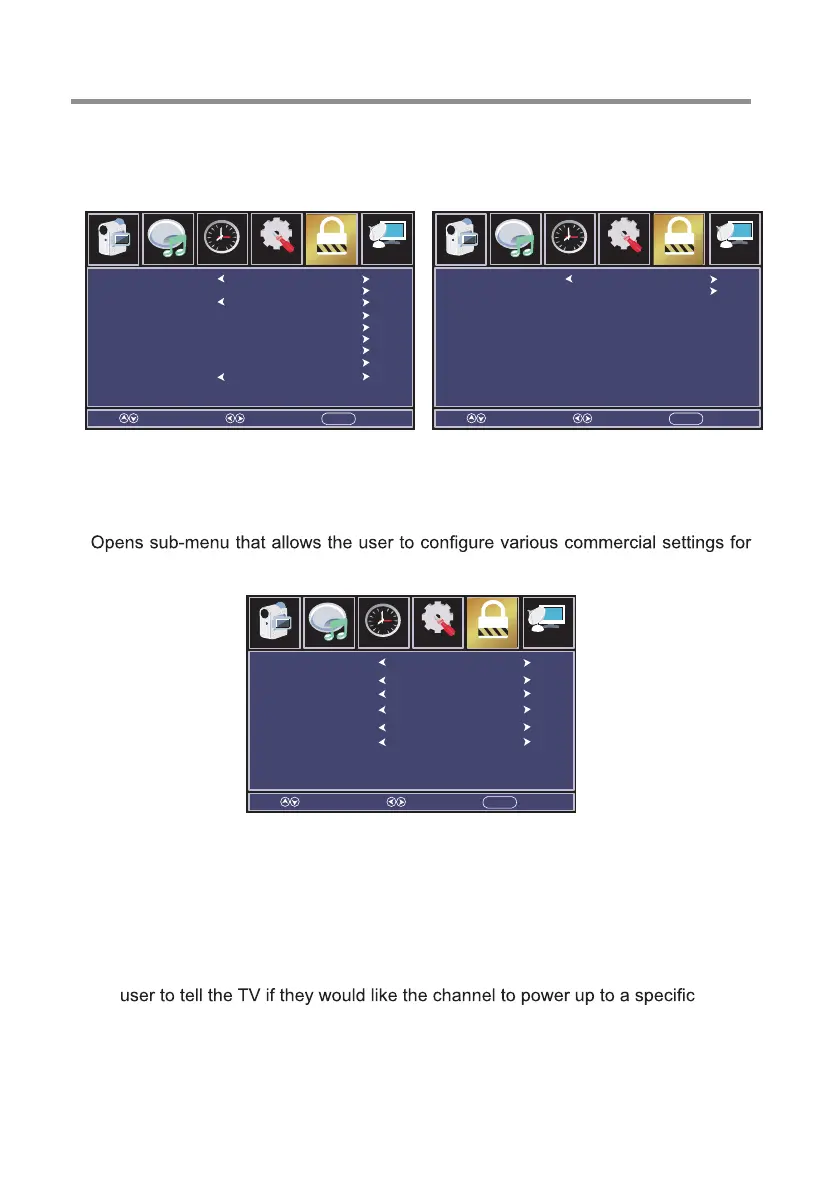
Commercial Menu
This feature allows you to set up the commercial features contained within this
television.
[Commercial Mode]
Turn on or off the commercial mode.
[Boot Setting]
the television.
A) Picture Mode - Set the default picture mode that the customer would like
each time the TV is powered on.
B) Default Volume - Set the initial volume level of the television for power on.
C) Max Volume - This feature allows the user to set a maximum volume level for
the TV.
D) Boot Source - Selection determines what state the TV is upon power on.
E) Boot Channel (not selectable unless ‘Boot Source’ is set to TV) - Allows the
channel when the TV is powered on.
F) Channel Select (not selectable unless ‘Boot Channel’ is selected) - Opens a
sub menu that allows the user to specify what channel they want the TV to tune
to when the unit is powered on.
Select Move EXITMENU
Channel
Audio
Picture
Time
12
6
Setup Parental
Picture Mode
Default Volume
Max Volume
Boot Source
Boot Channel
Channel Select
Standard
20
100
TV
Off
None
Select SelectMove MoveEXIT EXITMENU MENU
Channel Channel
Audio Audio
Picture Picture
Time Time
12 12
6 6
Setup SetupParental Parental
Commercial Mode
Boot Setting
Commercial Lock
Power Save
TV to USB
USB to TV
On Timer
Off Timer
Off
Normal
Off
Audio Output
Info Show
Reset Commercial
On


 To Next Page