19
TV Operation and System Setup
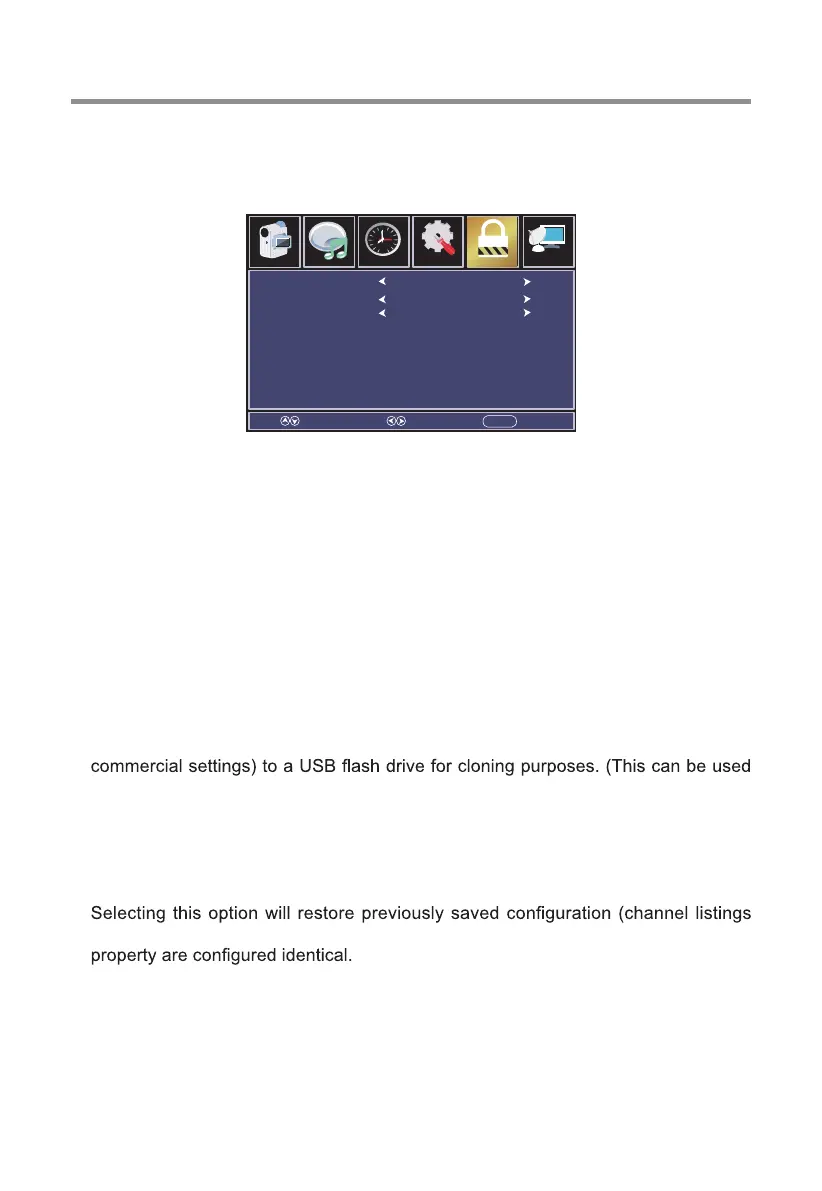
[Commercial Lock]
Sub menu that allows the user to lock out a variety of functions on the television.
[Power Save]
Sets the amount of time the TV sits idle with no button push or remote control
commands received before powering off.
[TV To USB] (requires the USB Flash Drive to be inserted in the USB port on the
television)
This option exports the current television configuration (channel listings and
to bypass setting up each individual television manually)
Note: Upon successful completion of coping the current configuration, the
television will power off.
[USB To TV] (requires the USB Flash drive used for EXPORT to be inserted in the
USB Port on the television)
and commercial settings) to the television to ensure that all televisions on the
Note: upon successful completion of restortion of the configuration file, the
television will power off.
****IMPORTANT: TV To USB/USB To TV options will only work with LIKE
model televisions. If you have different sizes/models, each style will require
it’s own USB FLASH DRIVE****
Select Move EXITMENU
Channel
Audio
Picture
Time
12
6
Setup Parental
Tuner Lock
Key Pad Lock
Menu Lock
Off
Off
Off
A) TUNER LOCK - Enabling this lock feature prevents the user from being able
to alter the channel lineup on the television by runnning a channel scan.
B) KEYPAD LOCK - Enabling this lock feature prevents the user from using the
console buttons to control the television.
C) MENU LOCK - Enabling this lock feature prevents the user from using the
on-screen menu to control the television.


 To Next Page