AIRCRAFT
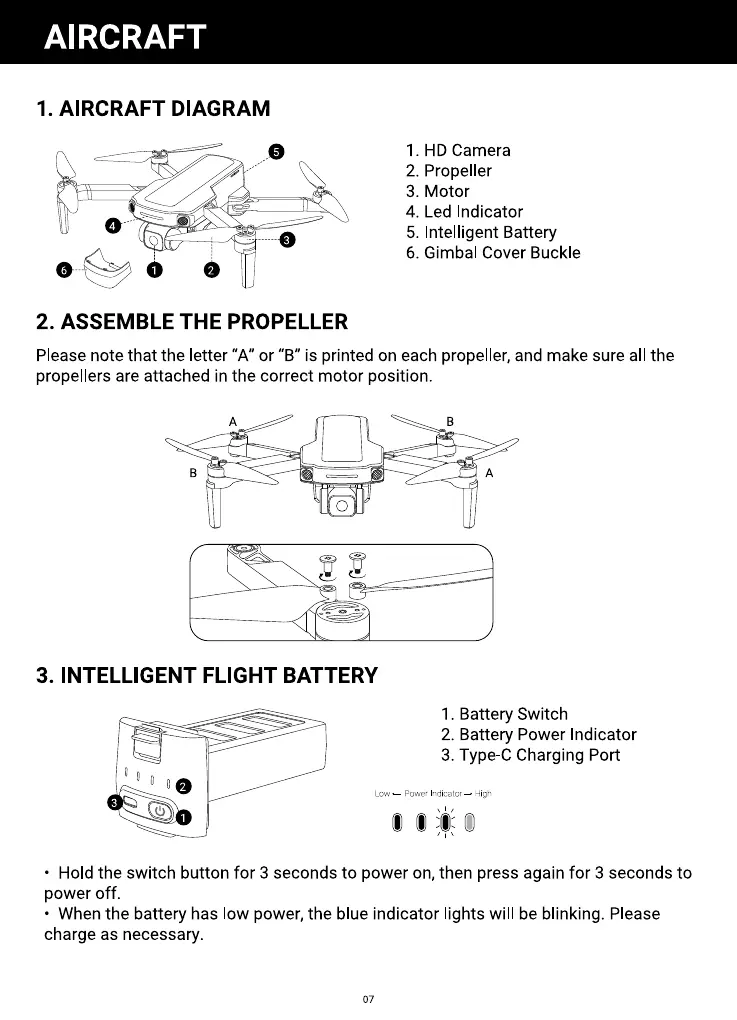
1. AIRCRAFT DIAGRAM
o
2. ASSEMBLE THE PROPELLER
1. HD Camera
2. Propeller
3. Motor
4. Led Indicator
5. Intelligent Battery
6. Gimbal Cover Buckle
Please note that the letter "A" or "B" is printed on each propeller, and make sure all the
propellers are attached in the correct motor position.
O
3. INTELLIGENT FLIGHT BATTERY
1. Battery Switch
2. Battery Power Indicator
3. Type C Charging Port
Low — Power Indicator— High
• Hold the switch button for 3 seconds to power on, then press again for 3 seconds to
power off.
• When the battery has low power, the blue indicator lights will be blinking. Please
charge as necessary.
07



 To Next Page