3.
Installation
3
WATTS
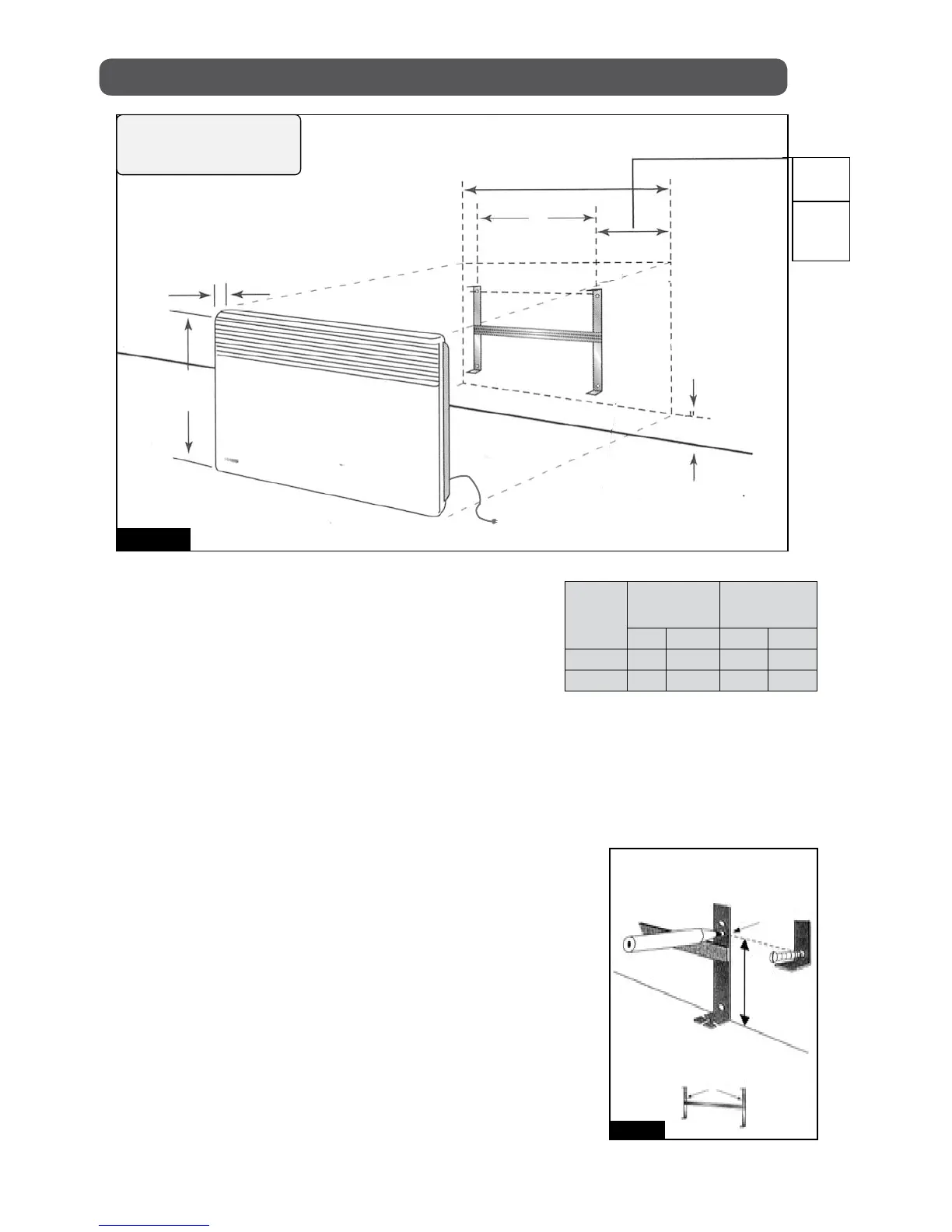
Width A
mm in mm in
500 340 13 3/8 155 6 1/8
1250 660 26 320 12 5/8
Figure 3b
PEN
BRACKET
B
MARK
FLOOR
7 1/8"
18 cm
B
MARK
USING THE MOUNTING BRACKET
AS A TEMPLATE FOR MARKING.
3- Relocate the mounting bracket to match the
marks with the holes for the bottom fasteners.
4- Check horizontality of the mounting bracket then
mark and pierce the 4 holes for fastening.
5- Replace mounting bracket and fasten it with
screws.
1- Free mounting bracket by pressing and
pulling both locking brackets.
2- Use the mounting bracket as a template by
holding it against the wall flush to the
floor. Use the B mark to locate the bottom
fasteners. With the template the unit will be
installed at 4 ” (10 cm) from the floor (Figure
3a & 3b).
3 1/8
"
80 mm
17 1/2
"
445 mm
4
"
100 mm
min.
Figure 3a
8 1/8"
205 mm
500 w
8 1/2"
215 mm
WIDTH
A
IMPORTANT :
Plan to use a dedicated
electrical circuit for the heater.
TO 120V POWER
OUTLET


 To Next Page