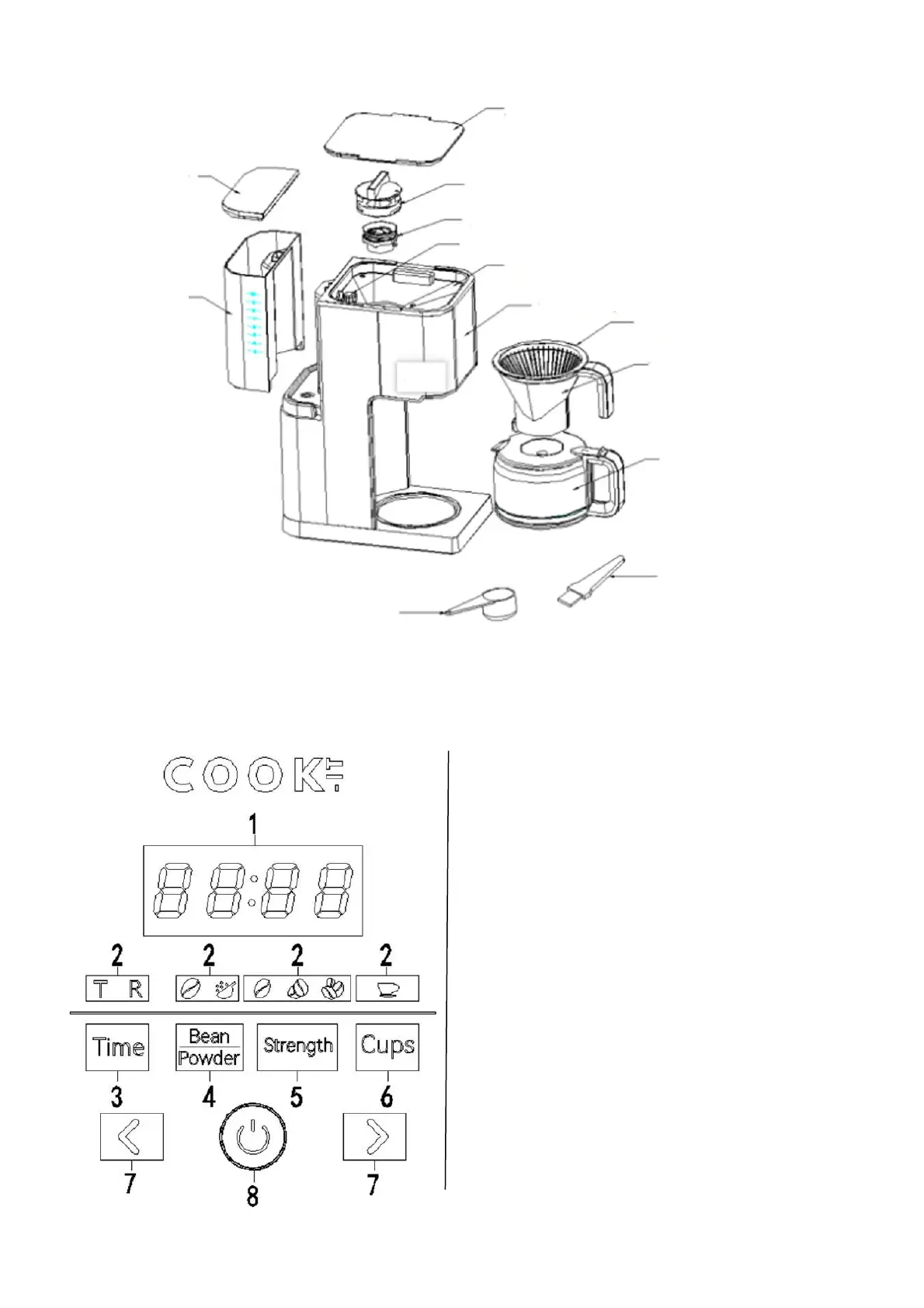
CONTROL PANEL OPERATION INSTRUCTIONS
LID
PROTECTIVE COVER BRACKET ASSEMBLY
GRINDING KNIFE (TOP)ASSEMBLY
POWDER THICKNESS ADJUST KNOB
BEAN BOX LID
CONTROL PANEL
FILTER SCREEN
FILTER CUP
COFFEE POT
BRUSH
SPOON
TANK
TANK COVER
1. Display screen
Displays time and number of cups
2. Indicator light
Each time you press the button to select a different
item, the corresponding indicator lights up
3. Time/Timer
Enter the time adjustment/Timer adjustment state
4. Beans/Powder
Coffee choice: Whether to add coffee beans or
ground coffee
5. Taste
Coffee concentration choice
6. Cups
Select the amount of cups you want
7. Add and subtract key
When setting time or cup quantity, you can press this
button for quick adjustment
8. Start/stop
Work start/stop button



 To Next Page