NOTE: Accessories having a non-stick coating will, over time, suer damage from
harsh detergents (including dishwashing) so we suggest hand washing.
WARNING. DO NOT use abrasive, caustic, or solvent cleaners on your appliance.
These may damage the surface finishes.
4. Wipe the outside of the Top Cover (1) and Upper / Lower Body (2-3) with a moist cloth.
5. Dry thoroughly with a soft cloth.
6. Next, take the time to familiarise yourself with the Control Panel. See below outlining
the functions available.
WARNING: DO NOT immerse the Body (2-3), Power Cord or Mains Plug (14) in
water or any other liquid.
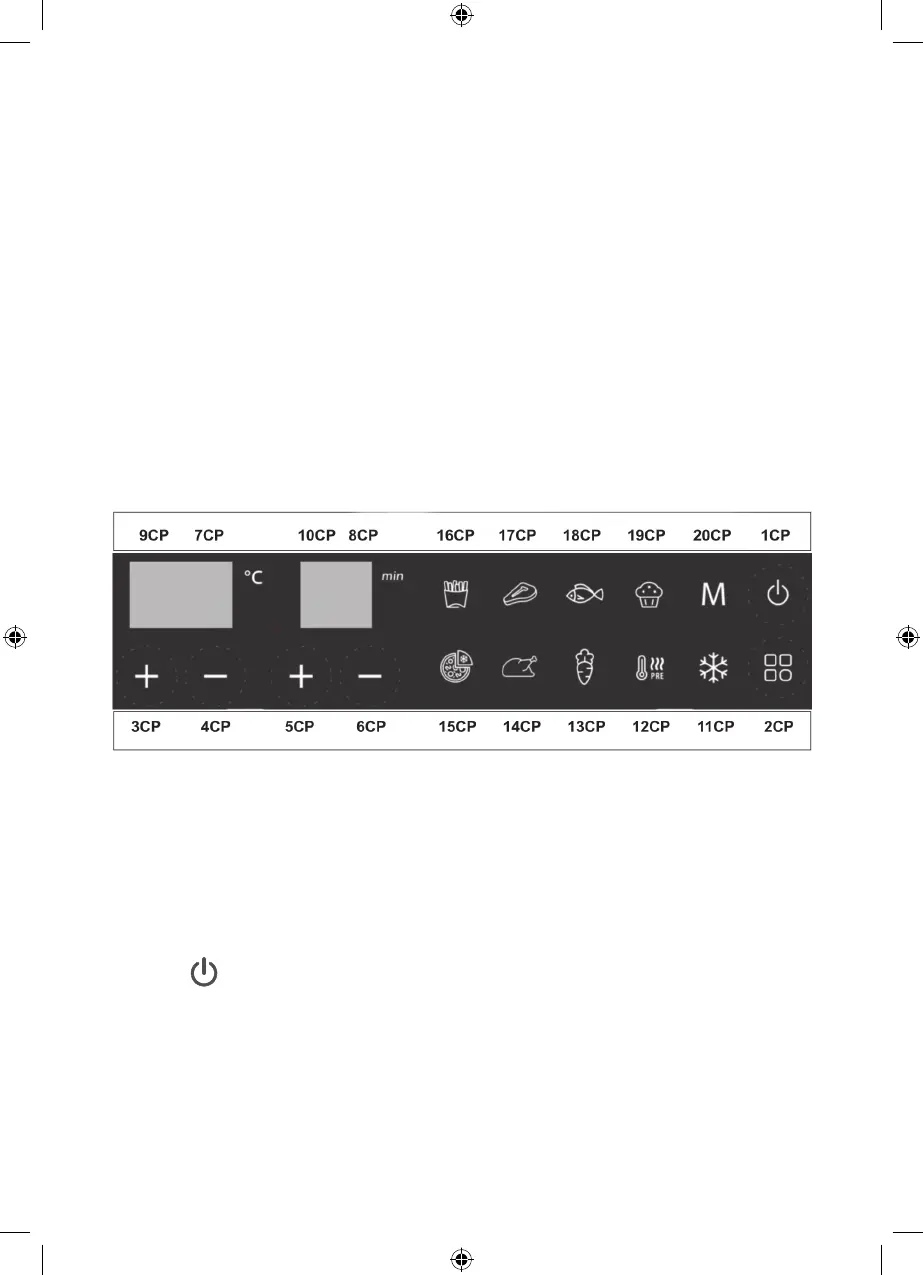
Control Panel Functions
Explanation of Control Panel Keys.
Your Control Panel (CP) is touch sensitive making function selection very easy indeed.
To avoid any confusion with the General Description numbering on PAGE 3 all your
Function Keys in this manual will be suxed with C P.
Icon Explanation.
Key 1CP – Power Key
With power connected, insert the Cooking Tray into the Tray Opening (9) ensuring it
is pushed fully home. Selecting the Power Key for 0.5 seconds will turn the unit to the
default mode of Chips the temperature is set to 180°C, and a cooking time of 20 minutes.
Selecting the Power Key, a second time will start the cooking process based on those
settings. When operating, pressingthe Power Key for 2 seconds will “Beep” once and turn
OFF the Air fryer. The Display (9CP will show OFF. After 10 seconds the Air Fryer will
then return to Standby.
8


 To Next Page