EasyManua.ls Logo

Cool-Living CLYW-53C2A-M09AD - User Manual

Default Icon
19 pages
Print Icon
To Next Page IconTo Next Page
Loading...
Question and Answer IconNeed help?

Do you have a question about the Cool-Living CLYW-53C2A-M09AD and is the answer not in the manual?

Summary

Safety Instructions

Installation Safety

Safety guidelines specific to installing the air conditioner unit.

Operation Safety

Crucial safety precautions for operating the air conditioner.

Specifications and Operation Instructions

Features Overview

Identifies and describes the main components and features of the air conditioner.

Operation Panel Functions

Explains the controls and indicators on the unit's operation panel.

Remote Control

Remote Control Operation

Details on using the remote control for the air conditioner.

Remote Safety and Maintenance

Guidelines for safe use, battery replacement, and adjustments.

Air Direction and Exchange Adjustment

How to adjust airflow direction and fresh air function.

Maintenance

Before Operational Seasons

Pre-season checks and preparations for the air conditioner.

During Operational Seasons

Routine maintenance tasks to perform while the unit is in use.

After Operational Seasons

Procedures for storing and preparing the unit after the cooling season.

Troubleshooting

Initial Checks and Common Issues

Steps for diagnosing and resolving common air conditioner problems.

Operational Phenomena Not Indicating Faults

Explains normal operating sounds or conditions that are not malfunctions.

Installation

Installation Requirements and Hardware

Details on window compatibility, necessary parts, and tools for installation.

Installation Position

Guidance on choosing an appropriate location for installation.

How to Install

Overview of the initial steps for installing the air conditioner.

Remove Chassis

Steps to remove the front panel and chassis from the unit.

Install Upper Guide and Curtain

Guidance on installing the window filler panels and curtains.

Place Cabinet in the Window

Instructions for positioning and securing the unit in the window opening.

Install Support Bracket

Steps for attaching support brackets to secure the unit.

Install Window Lock and Sash Seal

How to install the window lock and sash seal for security.

Install Chassis and Front

Steps for reinstalling the chassis and front panel to the unit.

Secure the Air Conditioner

Final steps to secure curtains and the unit in the window.

Test Running

Procedures for testing the unit after installation.

Installation with Storm Window

Specific instructions for installation when a storm window is present.

Removal from Window

Steps for safely removing the air conditioner from the window.

Dismantling Caution

Important precautions when dismantling units with fresh air function.

4 Months Limited Warranty

Warranty Terms and Conditions

Outlines the warranty period, coverage, exclusions, and purchaser responsibilities.

Overview

This document is an installation and operation instruction manual for COOL-LIVING™ window-type air conditioners, specifically for models CLYW-53C2A-M09AD and CLYW-70C2A-M09AD. It provides comprehensive guidance for safe installation, operation, maintenance, and troubleshooting of the unit.

Function Description:

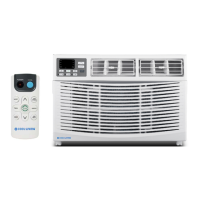
The COOL-LIVING™ window-type air conditioner is designed to provide cooling and ventilation for indoor spaces. It is intended for installation in standard double-hung windows with specific opening widths. The unit features various operational modes including COOL, DRY (dehumidifying), FAN (ventilation), and ENERGY SAVER. Some models may also include a fresh air function for air exchange. The air conditioner is controlled via an operation panel on the unit itself and, for some models, a remote control.

Important Technical Specifications:

While specific technical specifications like BTU ratings or power consumption are not detailed in the provided excerpts, the manual indicates that the unit operates within a temperature setting range of 16°C (61°F) to 32°C (90°F). The timer function allows for settings within a 1-24 hour range. The installation requirements specify an actual window opening width from 30" to 42-3/8" and a clear vertical opening of 19-7/8". The unit requires connection to a properly grounded 3-prong outlet.

Usage Features:

  • Digital Display: In FAN mode, it shows room temperature; in COOL or DRY mode, it shows the setting temperature. During timer operation, it displays the timer time. If the room temperature sensor fails, it indicates 25°C (77°F).
  • Remote Controller Signal Receiver: Receives signals from the remote control.
  • ENERGY SAVER Mode: Fan operation is synchronized with compressor operation. The fan delays 1 minute after the compressor turns off and stops for 10 minutes, then runs for 20 seconds before the compressor turns on again.
  • TIMER Button: Used to enter Switch-OFF mode when the unit is running, or Switch-ON mode when off. Pressing it again cancels the timer. Used with TEMP/TIME buttons to set the timer duration.
  • SPEED Button: Adjusts air rate to HIGH, MED, or LOW.
  • MODE Button: Cycles through operation modes: ENERGY SAVER, DRY, FAN, and COOL.
  • TEMP/TIME Button: Adjusts the setting temperature from 16°C (61°F) to 32°C (90°F). In timer setting state, it sets the timer time within 1-24 hours. Pressing "and " buttons simultaneously switches between Celsius and Fahrenheit display.
  • ON/OFF Button: Turns the air conditioner on or off.
  • CHECK FILTER: An LED light reminds the user to clean the filter after 250 hours of operation.
  • FILTER RESET Button: Resets the filter timer and turns off the "CHECK FILTER" LED.
  • Air Direction Adjustment: Up/down air flap can be manually adjusted. Left/right air direction is adjusted via a control tab.
  • Air Exchange (Fresh Air Function): For models with this feature, a lever can be pushed backward to get fresh air or pulled forward to close the function.

Maintenance Features:

  • Pre-Operational Checks: Before seasonal use, check for objects blocking airflow, corrosion/rust on the installation base, and proper grounding.
  • Filter Cleaning: The air filter screen should be cleaned every two weeks. To clean, gently open the front grille, lift out the filter screen, wash with lukewarm water (around 30°C/86°F), and air dry. Do not use abrasives, solvents, or boiling water.
  • Seasonal Shutdown: Before storing for the season, set the temperature to 30°C (86°F) and run in cooling mode for half a day to dry the interior. Then, stop operation, turn off the power, unplug the unit, clean the air filter screen, clean indoor and outdoor units, and remove batteries from the remote control.
  • General Cleaning: Use a soft dry cloth or a vacuum cleaner hose attachment to wipe the unit. For heavy dirt, use a cloth soaked with a mild household detergent.
  • Troubleshooting Guide: The manual includes a troubleshooting section to help users diagnose common issues such as the unit not starting, insufficient cooling/heating, abnormal sounds, or remote control issues. It advises checking power connections, fuse status, timer settings, ambient temperature, filter cleanliness, window/door closure, direct sunlight exposure, and heat sources.
  • Warranty: The product comes with a 4-month limited warranty against defects in materials and workmanship on functional parts from the original date of purchase. Registration within 30 days of purchase is required for warranty validity. The warranty covers functional parts only and excludes cosmetic issues, shipping damage (unless shipped directly by the manufacturer), negligence, misuse, alterations, improper installations, and normal wear and tear. It also specifies that the manufacturer is not liable for incidental or consequential damages.

Cool-Living CLYW-53C2A-M09AD Specifications

General IconGeneral
BrandCool-Living
ModelCLYW-53C2A-M09AD
CategoryAir Conditioner
LanguageEnglish

Related product manuals