©
2023
- 16 -
Handbook
6.7 User Parameter Setting
Use a set of passwords to enter the parameter setting state (factory default password
is 1111), press the 'S' key and keep it
After 3 seconds, enter the user parameter setting state, and the digital tube will
display '---0'. Press' '
Key cycle to select the current password position, press the key to set the current
password value, and after the password setting is completed
Press the 'S' key to confirm. If the password is incorrect, the 'Err' buzzer will sound
three times before exiting the parameter setting
Set the state; If the password is entered correctly, the buzzer will sound once and
enter the parameter setting state. At this time
The code tube displays' U10 ', use the' 'or' 'keys to select the parameter code, select
a parameter, and then press the
The 'S' key displays the set value of the parameter, and then press the' 'or' 'key to
adjust the parameter
After setting, press the 'S' button again to return to the displayed parameter code
status.
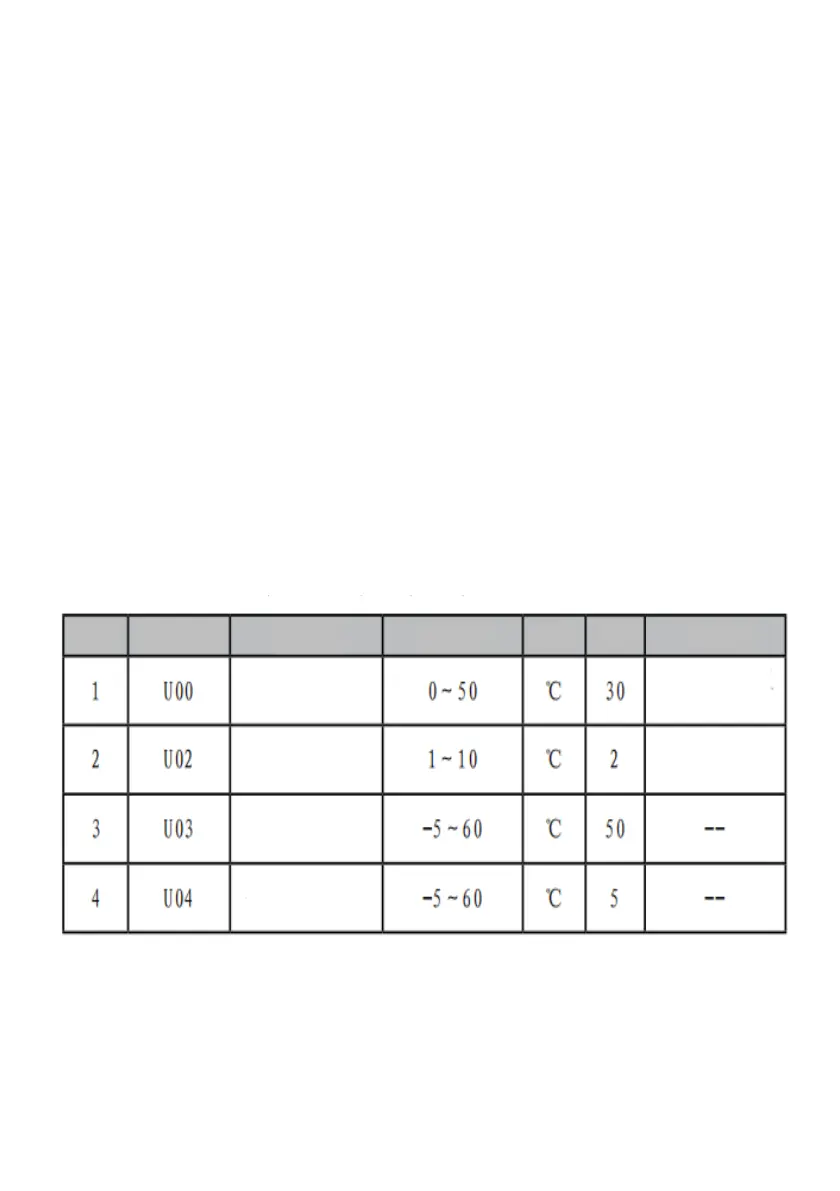
7.4 User Parameter Setting
High Temperature
Cooling
Temperature
Setting
Cooling Differential
Alarm
Low
Temperature
Alarm
Serial No
Displa
y
Meaning
Code
Name
Value Range
Unit Default
Set cooling start
temperature
Cooling differential


 To Next Page