COMPILING CDs
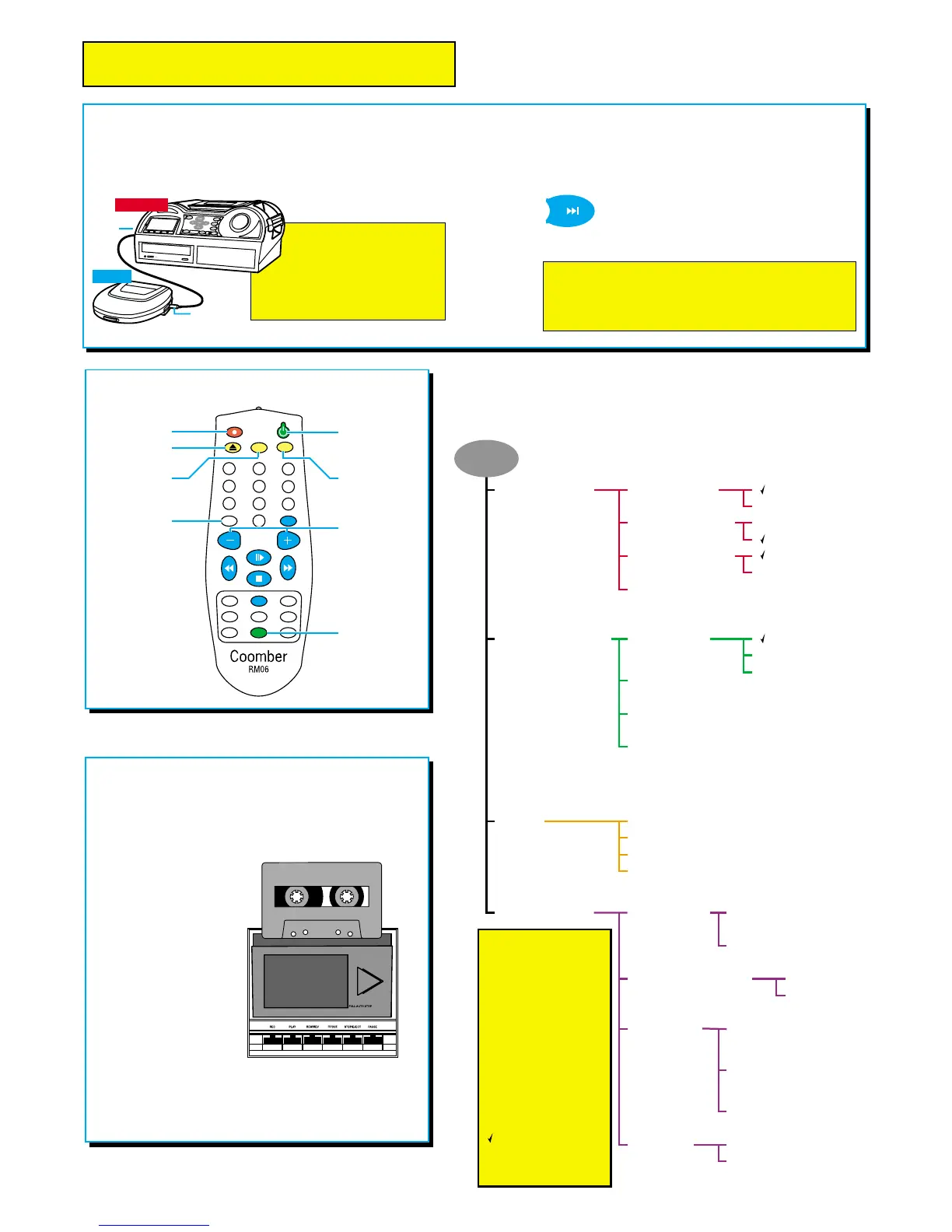
With a personal CD player you can compile
previously recorded tracks onto a new CD.
Use a Coomber 1987
patch lead to connect a
CD player to the Recorder
(as shown). You play selected
tracks and record them to CD
by pressing the record key.
1
2
0
9
8
7
6
5
4
3
GOTO CUE
A/B
LEVEL
INTRO
SPEED
TREB
RAND
PROG
BASS
REP
MUTE
BAL
Record
Open / Close
Function not
available on
these models
Off (Stand-by)
unit can only be
switched on using
the keypad ON/OFF
key or at the mains
Up / Down
(as rotary control)
GOTO
allows you to select
track numbers
greater than 9
Trac k 21 would be
reached by pressing
GOTO, 2 and 1
Manual Record Level
Mute / Unmute
speakers and
headphones
Features found
on the remote
are the same as
on the keypad or
the menu, except
for those differences
indicated here.
REMOTE CONTROL UNIT
USEFUL FEATURES
You can also:-
compile a CD from cassette or vinyl
records (via a hi-fi or pre-amp)
Tip: if you press the forward key
while recording, a new track will
begin.
This is a useful editing feature for use when
recording from a continuous source, such as a tape.
Note: although no audio information is lost,
a two second gap will appear between tracks.
THE CASSETTE DECK6021 model only
Use the cassette deck to:-
•Record from CD, external source or mic
• Copy cassette to CD
• Copy CD to cassette
•Play cassettes
To prevent damage to
the cassette heads and
door, please ensure that
the cassette is loaded
as shown.
The Real Time CD Recorder software recognises when a
cassette is playing or recording. Information will appear
on the screen indicating activities being undertaken by
the tape deck.
MENU
Record options
Record level mode
Automatic record level
Manual record level
Two microphone setup
2 mics are a stereo pair
2 mics are dual mono
Playback options*
options appear when a CD
with audio tracks has been
inserted.
Repeat options
Programme
Select tracks for playing in the order of your choice.
Intro
Select to play the first 5 seconds of each track, allowing
you to listen to and select a track of your choice.
Upon hearing the desired track, press the PLAY key.
Intro mode is cancelled and the track will continue to play.
Random
Select to play all of the tracks in a random order.
no repeat
repeat track
repeat disc
Display options
* All menu functions
return to their default
settings when the unit
is restarted - except for
items marked with an
asterisk * which return
to default settings when
a new CD is inserted.
†
Option appears when
a CD-RW is inserted.
††
The availability of this
option is dependant
upon the type of
CD drive fitted.
Tick indicates default
selection at startup.
Contrast
Select to adjust display contrast
using rotary control knob.
Backlight Off
Select to switch off the backlight.
Invert
Select to invert the LCD image
from positive to negative.
Speaker options
Keypad & remote options
Disable keypad can only be
deselected by restarting the unit.
Service Info
Shows information
about your Real Time
CD Recorder - useful info for advice or support.
Erase
†
& copy functions
Copy disc 6030/6031 models only
Copy tracks
6030/6031 models only
Fade on record stop
Option available during recording. Select to provide a five
second fade-out when STOP is selected to end recording.
Other settings
Disable keypad
Disable remote
Show build information
Show drive information
Dual disc record mode
6030/6031 models only
Record to one disc only
record to both discs
Erase disc
Erase last track
††
Option available when a CD-RW has at least one track.
Mute speakers
Select to mute/unmute speakers.
Turn PA mode on
Select for public address via mic.
ADVANCED USER MENU
More experienced users may wish to use facilities
available in the menu shown here.
Press the MENU key and select choices using the four
menu keys located below the LCD screen.
Replacement
Part No. 1920


 To Next Page
 Loading...