QD3 Quik-Drive Voltage Regulator Tap-Changer Manual
22
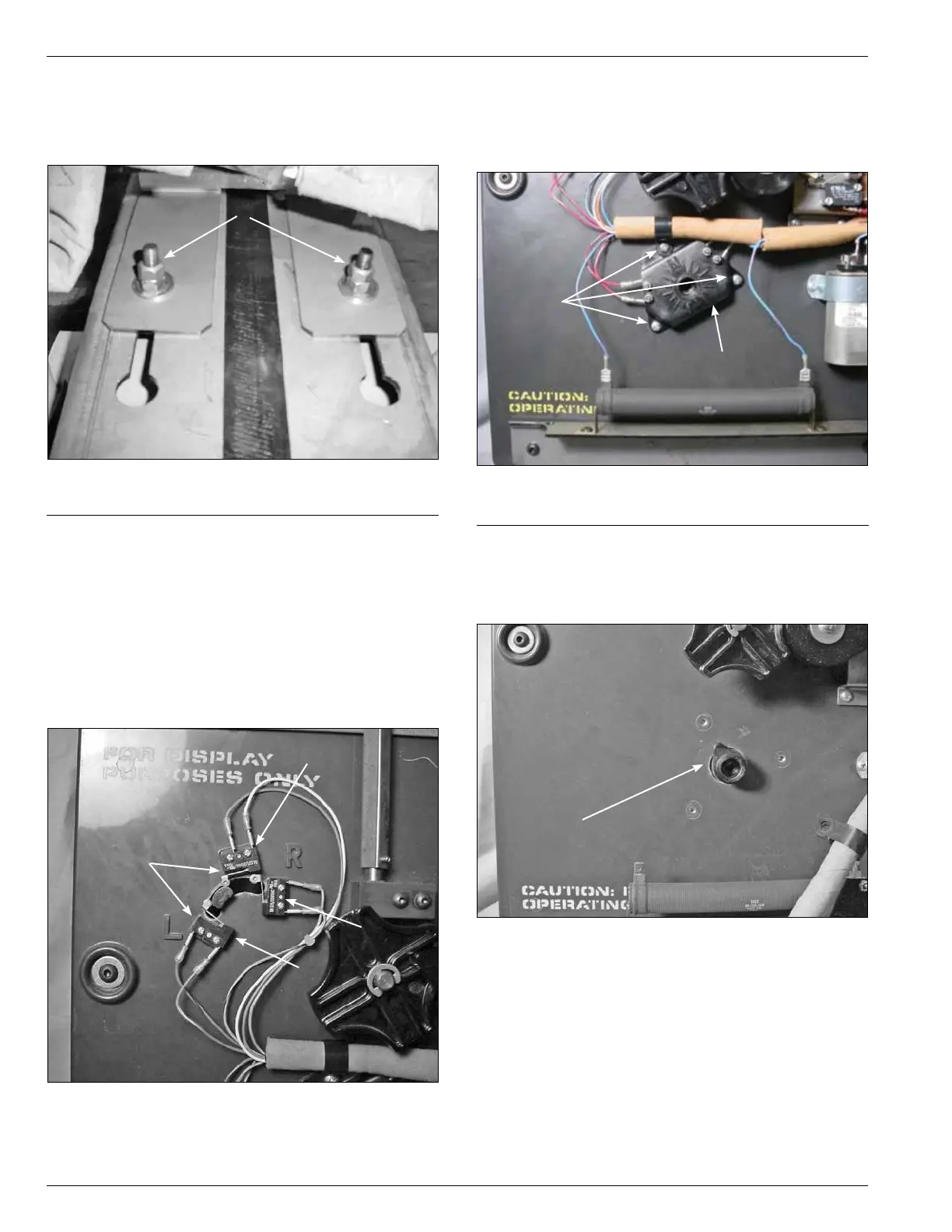
7. Remove the mounting bolts fastening the tap-changer-
mounting bracket to the top core clamp. (See Figure
43.) Remove the tap-changer from the regulator and
place on a work surface.
QD3/T350 Tap-changer Assembly
Separation
1. After removing the tap-changer from the regulator
assembly, use a Phillips head one point screwdriver
to loosen and remove the six screws mounting the
Reversing Lower, Raise and Neutral switch located
in the upper left corner of the tap-changer assembly.
(See Figure 44.)
Figure 43.
Tap-changer to core clamp fastening hardware.
Mounting Hardware
Figure 44.
Lower, raise and neutral logic switches.
Screws
Neutral
Raise
Lower
2. UsingaPhillipsheadscrewdriver,loosenandremove
the three mounting screws fastening the position
indicator micro switch hub to the front of the tap-
changer assembly. (See Figure 45.)
3. Remove the tapping indicator position lob pointer
from the tap-changer. The lob may have to be pried a
little to be removed. (See Figure 46.)
Figure 45.
Position indicator hub.
Screws
Position Indicator Hub
Figure 46.
Position indicator hub.
Position Indicator Hub



 To Next Page