QD3 Quik-Drive Voltage Regulator Tap-Changer Manual
56
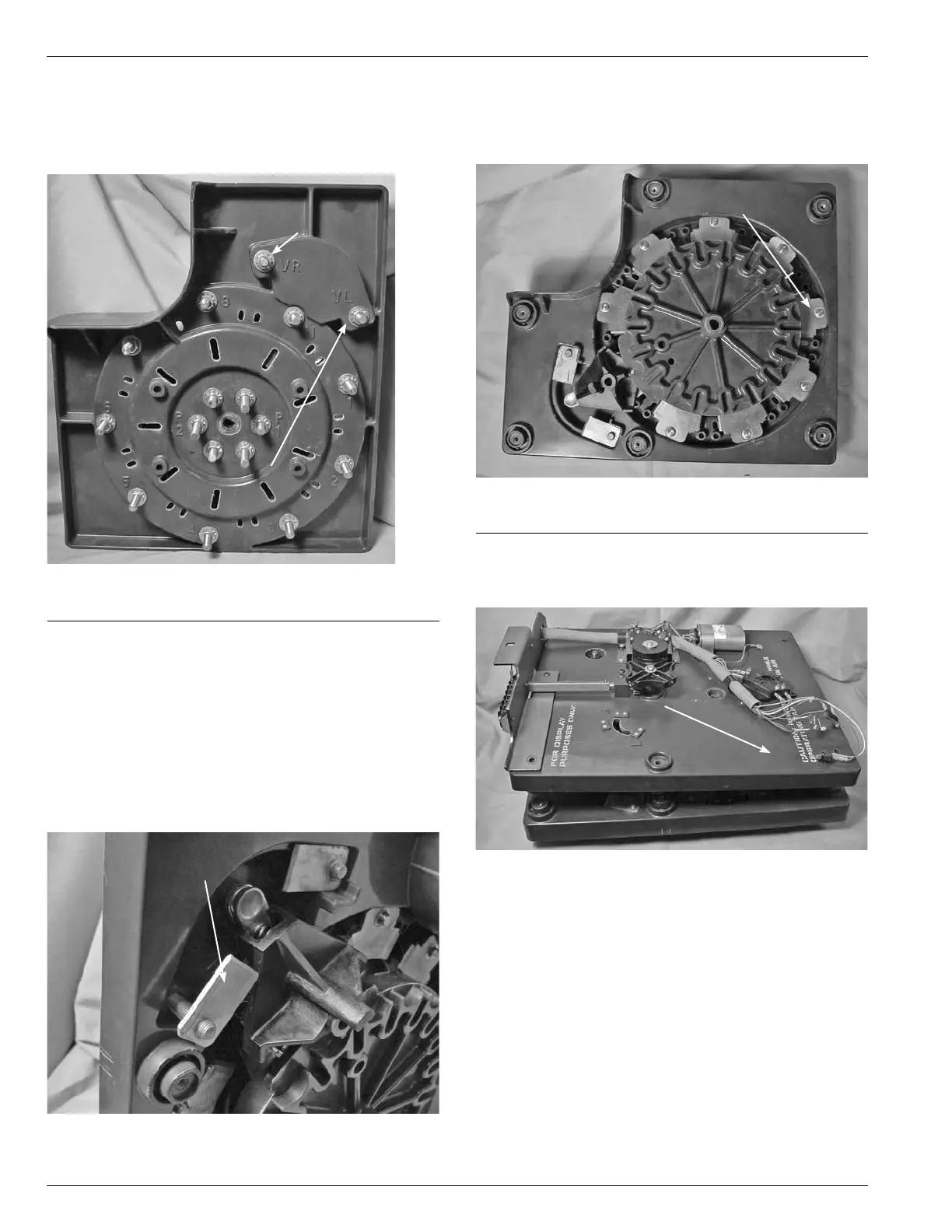
4. Using a 9/16 wrench, or 9/16 socket and ratchet loosen
and remove the nut, external lock washer, and at wash
for the VR and/or VL stationary contact. (See Figure
162.)
Figure 162.
VL and VR fastening hardware.
VR Stationary Contact
Fastening Hardware
VL Stationary Contact
Fastening Hardware
5. Push the stationary contact stud through the contact
panel removing the stationary contact from the contact
panel. (See Figure 163.)
6. Place stationary contacts in either VR or VL position or
both. (See Figure 163.)
7. Place a at brass washer, external tooth lock washer,
and nut on the stationary contact stud. Tighten and
torque to 6070 poundinch torque (6.7797.908 Nm).
Figure 163.
Stationary contact removal.
Stationary Contact
Tap-Changer Re-Assembly
1. Lay the contact panel assembly section at on a table
surface. (See Figure 164.)
Figure 164.
Stationary contact panel assembly.
Stationary
Contact Panel
2. Place and align the tapchanger drive assembly section
on top of the contact panel assembly. (See Figure165.)
Drive Panel
Assembly
Figure 165.
Tap-changer sections.



 To Next Page