- 10 -
Maximum Speed Alert Setting
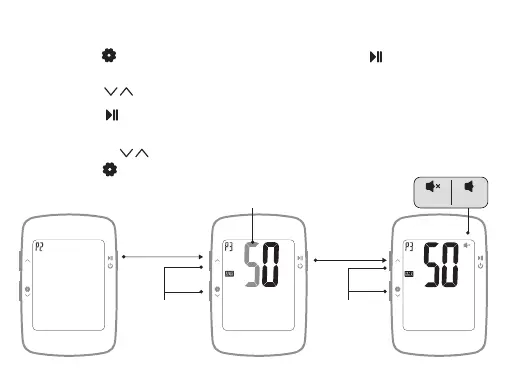
Long press to enter the setting mode (P1~P3), short press to enter the P3
maximum speed alert setting, the currently set numerical value flicker display;
1.1
Short press to switch numerical value;
1.2
Short press to confirm the current setting and enter the next digit setting or
the next setting;
Short press to set the prompt tone on / off, after the setting is completed,
Long press to exit or no operation for 15s to automatically save and exit.
1.3
1.4
KMH
KMH
KMH
Short press
off on
Short press to
increase or
decrease the
number value
Short press to
set alert on / off
Confirm to
enter the next
setting
Setting flicker display


 To Next Page