- 8 -
Time Zone Setting
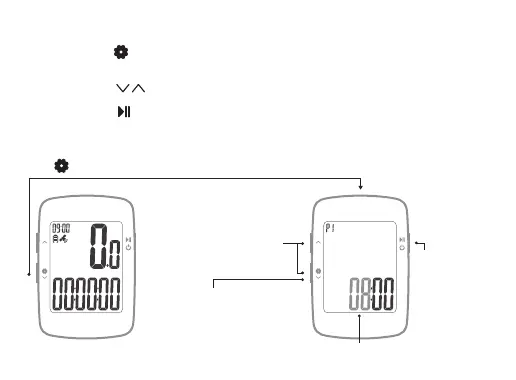
Long press to enter the setting mode (P1~P3), P1 time zone setting, the
currently set numerical value flicker display;
1.1
Short press to switch numerical value;
1.2
Short press to confirm the current setting, and enter the next digit or the
next setting (P2 metric / imperial setting);
The device will automatically save and exit after 15s no operation or long press
to exit the setting.
1.3
1.4
UTC TIME
KMH
Long press
Setting flicker display
Long press to save the
settings and exit, If no
operation for more than 15
seconds, automatically save
and exit
Short press to
confirm the
current setting,
enter the next
digit or the next
setting
Short press to
increase or decrease
the numerical value


 To Next Page