- 9 -
The device will automatically save and exit after 15s no operation or long press
to exit the setting.
Setting Metric and Imperial Units
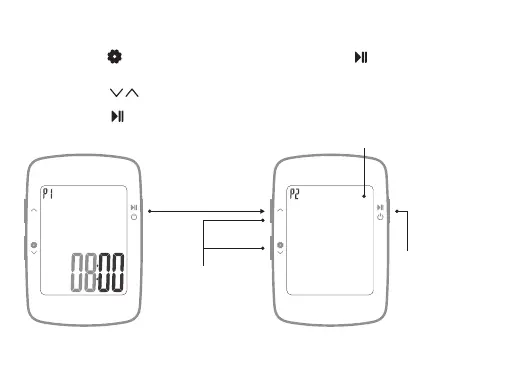
Long press to enter setting mode (P1~P3), short press to enter P2 metric /
imperial setting;
1.1
Short press to switch between metric (KMH) / imperial (MPH);
1.2
Short press to confirm the current setting and enter the next setting (P3
speed alert setting).
1.3
KMH
UTC
Short press
Setting flicker display
Short press to switch
between metric (KMH) /
imperial (MPH)(default
KMH)
Short press to
save the current
setting and enter
the next setting


 To Next Page