EN
- 3 -
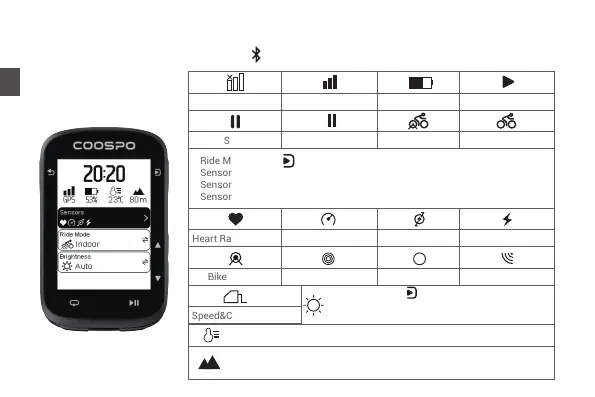
Status Page
GPS Off
Auto-Pause
Battery
Speed Sensor Cadence Sensor
Heart Rate Monitor
GPS Signal Intensity
Start
Stop
OutdoorIndoor
A
Bike Trainer
Shifting Di2
Speed&Cadence Sensor
Ride Mode: Press to switch the current ride mode;
Sensor connected: the sensor icon displayed;
Sensor added but not connected: sensor icon flashing;
Sensor not added: no sensor icon displayed.
Radar Sensor
Power Meter
D
Connect to CoospoRide APP successfully, displays .
Temperature: May differ from actual ambient temperature.
Elevation: factory calibrated, default auto-calibration when GPS
is turned on.
Brightness: Press to adjust the current
backlight level; Auto: Brightness adjusts
automatically based on ambient light conditions.


 To Next Page