3
109118-1 Rev. A,10/96
1
1.1 Unpacking and Installation
1. The main carton will contain the following:
Meter with a shorting (test) clip in the pH socket
Meter Dust Cover
Power Supply
This Instruction Manual
Memo Cards, English, French, German, Italian,
Spanish
Warranty Card
Calibration Certificate
2. If you ordered the meter with an electrode, electrode arm
and accessories, the top tray of the main carton will
contain these items. Refer to the accessories packing sheet
for a list of the additional components.
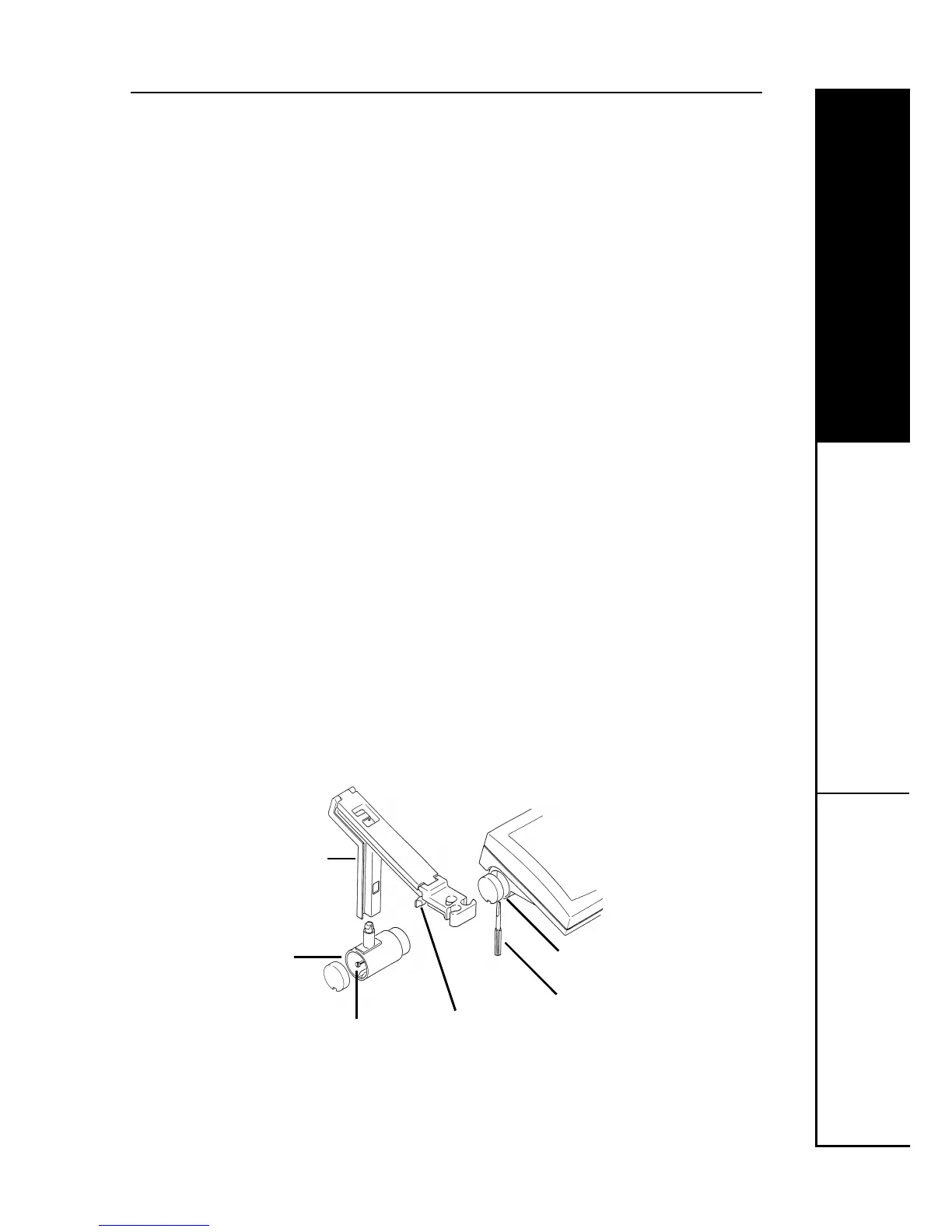
3. To attach the electrode arm to the pH meter:
a. The electrode arm can be attached to the left or right-
hand side. Using the screwdriver supplied remove the
appropriate end cap from the pH meter.
b. Slide the arm base into the recess and tighten the fixing
screw. Replace the end cap.
c. Fit the electrode arm onto the post. Adjust the tension
screw as required.
4. Fill in and return the warranty card. For your record make
a note of the serial number, date of purchase and supplier
on the inside front cover of this manual.
electrode arm
arm base
fixing screw
end cap
screwdriver
tension screw


 To Next Page