Need help?
Do you have a question about the CORNING CCH and is the answer not in the manual?
The most likely cause of a problem is connector end-face contamination. Keep dust caps on and clean before mating.
Use a CLEANER-PORT-LC tool to clean LC duplex connectors and shuttered adapters on the CCH module.
Use an MTP connector cleaning tool (p/n 2104466-01) to clean MTP connectors and adapters.
Periodically check fiber optic cable for bends, strain, crimping, or crushing.
Describes installation and maintenance of 12 and 24-fiber CCH modules with LC duplex shuttered adapters.
Important note: CCH modules are factory sealed. Breaking the seal voids the manufacturer's warranty.
WARNING: Laser light can damage eyes. Never look into the end of a fiber or at a connector with a laser coupled.
CAUTION: Cable is sensitive to pulling, bending, crushing. Do not exceed bend radius or apply excess force.
Lists required tools and materials, purchased separately, for the procedure.
Step 1: Remove a blank panel by pulling out both plungers of the panel's push/pull fasteners.
Step 2: Position module fasteners over holes and push plungers to lock the module in place.
Step 1: Align key, push MTP connector by boot until it clicks into the adapter.
Step 2: Grasp slider marked 'pull' and pull connector out. Do not pull on the boot.
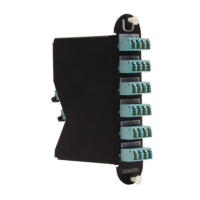
The Corning CCH Modules with LC Duplex Shuttered Adapters (cat. number 003-122) are designed for use within CCH Plug & Play™ System modules, available in 12 and 24-fiber versions. These modules are equipped with LC duplex shuttered connector adapters.
These modules facilitate the connection of MTP® trunks to LC duplex fiber optic cables. The primary function is to provide a reliable and clean interface for fiber optic connections within a CCH system. The shuttered LC adapters are a key feature, eliminating the need for individual dust caps and ensuring the adapters remain clean when not in use, thereby reducing the risk of contamination and improving connection reliability. The modules are factory sealed, and breaking this seal will void the manufacturer's warranty.
 General
| Brand | CORNING |
|---|---|
| Model | CCH |
| Category | Control Unit |
| Language | English |

 To Next Page