3
Instruction Manual
4.0 Operating Instruc tions
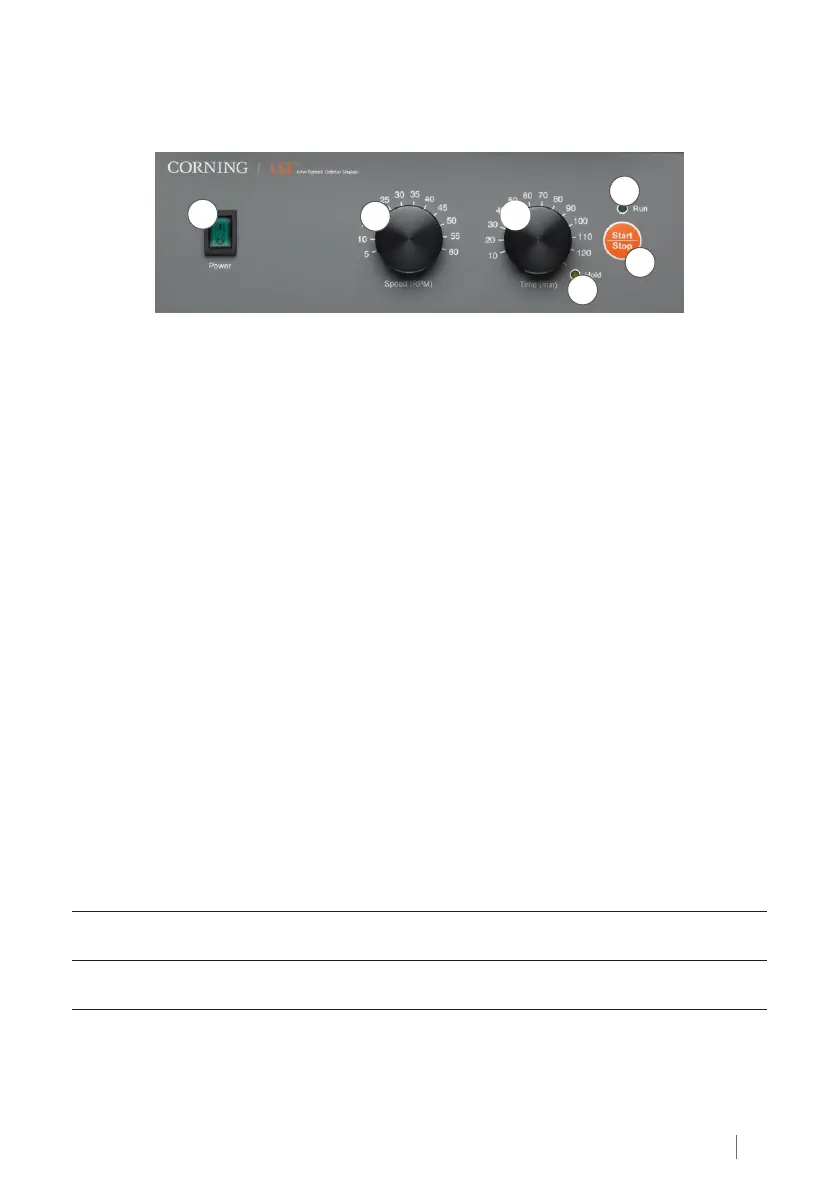
4.1 Controls
2
3
6
4
5
1
1. POWER switch: Turns the shaker ON (power switch illuminates) or OFF
2. SPEED knob: Sets the shaker speed
3. TIME knob: Sets the time of the shaker
4. HOLD yellow light: Illuminates when the shaker is set for continuous running
5. START/STOP button: START or STOP shaking
6. RUN green light: Illuminates when the shaker is running
4.2 Basic Operation
Switch on POWER.
Set SPEED knob on desired value.
Set TIME knob on desired value or on HOLD – continuous function (yellow light next to
HOLD will illuminate).
Press START/STOP button to start shaking.
Press START/STOP button to stop shaking (HOLD position). Device automatically stops after
the set time passes. NOTE: Pressing the START/STOP button during operation will reset the
timer.
5.0 Troubleshooting Guide
Be sure to disconnect the shaker from the main power source immediately in case of any
signs of malfunction and contact Corning Customer Service at 800.492.1110 or 978.442.2200.
Problem Solution
Power switch does not light up
Check the power connection. Check the fuses.
Contact Corning Customer Service.
Shaker does not start
Check the power connection. Check the fuses.
Contact Corning Customer Service.


 To Next Page