Instruction Manual 5
CORNING DIGITAL HOT PLATES, STIRRING HOT PLATES, STIRRERS
AND EXTERNAL TEMPERATURE CONTROLLER
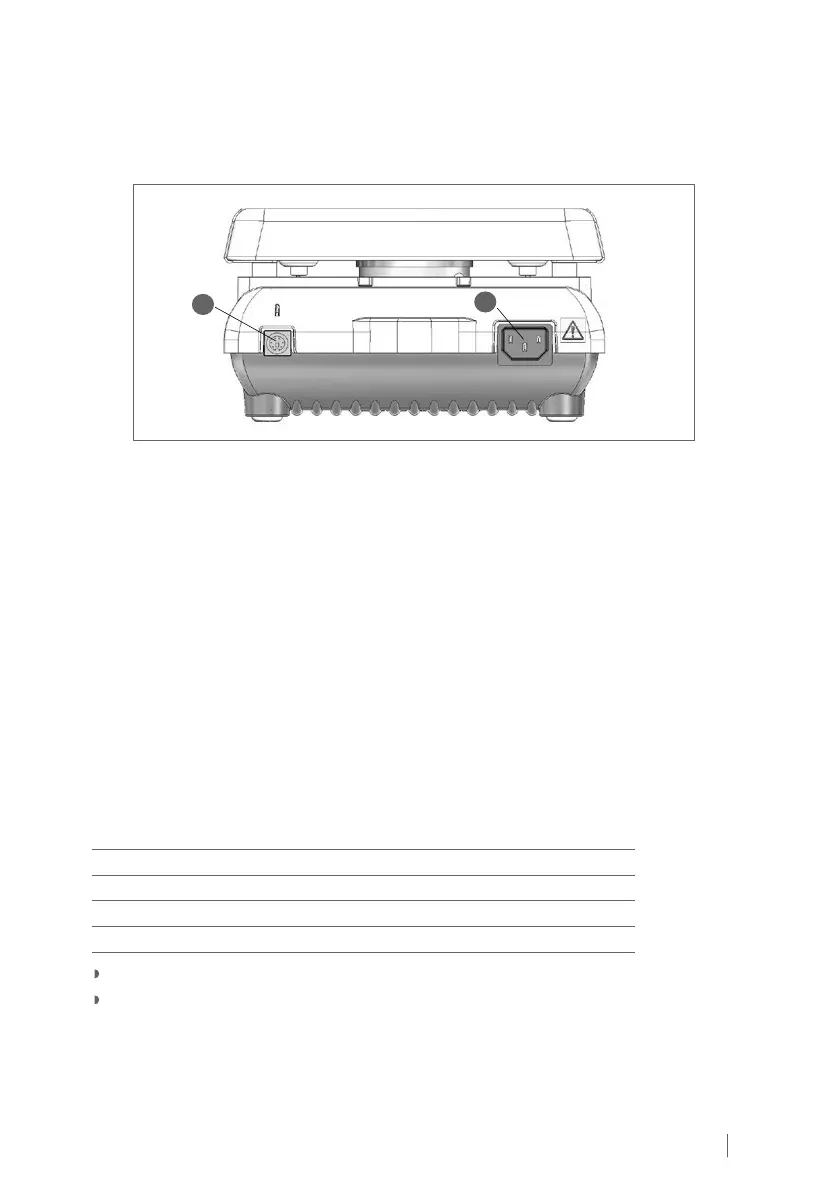
4.0 Product Connections
1. Power Cord Input: Connect the supplied power cord into this connector.
2. External Temperature Controller Input: Connect the optional External Temperature
Controller (Cat. No. 6795PR) into this connector.
To Connect/Disconnect the External Temperature Controller
1. Turn the Stir Control Knob and Heat Control Knob to the OFF position.
2. Disconnect power cord.
3. Insert/remove external temperature controller connector into/from the input connector.
4. Reconnect power cord.
5. Product is now ready for use.
5.0 Stirring Instructions
For Models: PC-410D, PC-420D, PC-610D, PC-620D
1. Fill the vessel with solution to be stirred.
2. Place the stir bar into the vessel.
3. Place the vessel in the center of the top surface.
4. Turn Stir Control Knob until the Stirring Speed Display shows the desired speed. The speed
setting can be adjusted according to the table below.
Operating Range (rpm) Adjustable Increment (rpm)
60 - 100 5
100 - 200 10
200 - 400 20
400 - 1,150 50
Flashing Display: The number will FLASH when the actual stirring speed is not at set speed.
ConstantDisplay:Thenumberwillnotashwhentheactualstirringspeedisattheset
speed. The number will remain constantly ON when the actual stirring speed is at the
set speed.
1
2



 To Next Page