EasyManua.ls Logo

CORONA 3 - User Manual

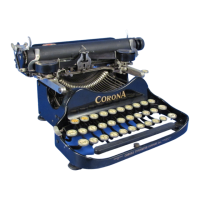
CORONA 3
20 pages
Print Icon
To Next Page IconTo Next Page
Loading...
DOMESTIC
mmsmammama
mm
i>^H)HMnHPIIM
HOW
TO
MSB.
9
Mersonal
WfR
i n^
Mach
i
ne
i
CORONATYPEWRITER
miNC
AR0I0N.N.Y
I
P,
II II
-
II
I I I
I
lll
l
Question and Answer IconNeed help?

Do you have a question about the CORONA 3 and is the answer not in the manual?

Summary

How to Use Corona Typewriter

Introductory Guide

Provides an overview of the manual's purpose and the typewriter's simplicity.

Unpacking and Setup

Step-by-step instructions for removing the typewriter from its case and preparing it for use.

Setting Paper Fingers

Guidance on adjusting the paper fingers for correct paper alignment during typing.

Inserting Paper Correctly

Detailed steps on how to properly insert paper into the typewriter.

Adjusting Paper Alignment

Instructions for straightening or adjusting paper after it has been inserted.

Using Margin Stops

Explains how to set and utilize the adjustable margin stops for line endings.

Line Lock Function

Describes the line lock feature that prevents typing errors at the end of a line.

Typing on Ruled Lines

Guidance for typing on ruled paper or filling in forms and blanks.

Line Spacing Adjustment

Instructions on how to adjust line spacing for single or double spacing.

Paper Table Extension Arms

Information on the use of extension arms for the paper table.

Operating Shift Keys

How to use the 'Cap' and 'Fig' keys for typing capital letters and numbers.

Starting a New Line

Method for moving the carriage to the beginning of a new line of text.

Backspace Key Usage

How to use the backspace key to correct errors or move backward.

Carriage Release Lever

Explains the function and operation of the carriage release lever.

Two-Color Device Operation

How to utilize the ribbon indicator for two-color printing.

Cutting Stencils

Instructions for using the Corona to cut stencils for duplication.

Reversing the Ribbon

Steps to reverse the typewriter ribbon when it is nearly depleted.

Writing on Cards and Labels

Guidance for typing on cards, labels, and using attachments.

Renewing the Ribbon

Detailed instructions for replacing a worn typewriter ribbon.

Manifolding Capabilities

Discusses the typewriter's ability to produce multiple copies efficiently.

Oiling the Typewriter

Specific points and procedures for oiling the Corona typewriter.

Cleaning the Typewriter

Advice and methods for keeping the typewriter clean to ensure longevity.

Oiling Diagram

An illustrated diagram highlighting all parts requiring oiling.

Putting Machine in Case

Instructions on how to properly place the typewriter into its carrying case.

Folding the Machine

Step-by-step guide on how to fold the Corona typewriter for storage.

General Machine Care

General maintenance tips and troubleshooting advice for the typewriter.

Corona Folding Stand

Instructions for setting up and using the optional Corona folding stand.

Accessories and Supplies List

Lists available accessories and supplies, such as ribbons and paper.

Security Warning

A warning about machine security and reporting theft.

Summary

How to Use Corona Typewriter

Introductory Guide

Provides an overview of the manual's purpose and the typewriter's simplicity.

Unpacking and Setup

Step-by-step instructions for removing the typewriter from its case and preparing it for use.

Setting Paper Fingers

Guidance on adjusting the paper fingers for correct paper alignment during typing.

Inserting Paper Correctly

Detailed steps on how to properly insert paper into the typewriter.

Adjusting Paper Alignment

Instructions for straightening or adjusting paper after it has been inserted.

Using Margin Stops

Explains how to set and utilize the adjustable margin stops for line endings.

Line Lock Function

Describes the line lock feature that prevents typing errors at the end of a line.

Typing on Ruled Lines

Guidance for typing on ruled paper or filling in forms and blanks.

Line Spacing Adjustment

Instructions on how to adjust line spacing for single or double spacing.

Paper Table Extension Arms

Information on the use of extension arms for the paper table.

Operating Shift Keys

How to use the 'Cap' and 'Fig' keys for typing capital letters and numbers.

Starting a New Line

Method for moving the carriage to the beginning of a new line of text.

Backspace Key Usage

How to use the backspace key to correct errors or move backward.

Carriage Release Lever

Explains the function and operation of the carriage release lever.

Two-Color Device Operation

How to utilize the ribbon indicator for two-color printing.

Cutting Stencils

Instructions for using the Corona to cut stencils for duplication.

Reversing the Ribbon

Steps to reverse the typewriter ribbon when it is nearly depleted.

Writing on Cards and Labels

Guidance for typing on cards, labels, and using attachments.

Renewing the Ribbon

Detailed instructions for replacing a worn typewriter ribbon.

Manifolding Capabilities

Discusses the typewriter's ability to produce multiple copies efficiently.

Oiling the Typewriter

Specific points and procedures for oiling the Corona typewriter.

Cleaning the Typewriter

Advice and methods for keeping the typewriter clean to ensure longevity.

Oiling Diagram

An illustrated diagram highlighting all parts requiring oiling.

Putting Machine in Case

Instructions on how to properly place the typewriter into its carrying case.

Folding the Machine

Step-by-step guide on how to fold the Corona typewriter for storage.

General Machine Care

General maintenance tips and troubleshooting advice for the typewriter.

Corona Folding Stand

Instructions for setting up and using the optional Corona folding stand.

Accessories and Supplies List

Lists available accessories and supplies, such as ribbons and paper.

Security Warning

A warning about machine security and reporting theft.

CORONA 3 Specifications

General IconGeneral
BrandCORONA
Model3
CategoryTypewriter
LanguageEnglish