Need help?
Do you have a question about the Coros VERTIX 2 and is the answer not in the manual?
Download the COROS mobile application using the provided QR code or website address.
Create a free COROS user account via the mobile application to manage your watch and data.
Press and hold the power button for three seconds to turn on your COROS VERTIX 2 watch.
Connect your COROS VERTIX 2 watch to the COROS mobile app to enable pairing and synchronization.
 General
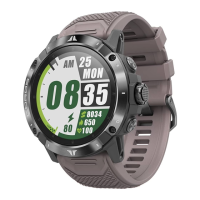
| Display Size | 1.4 inches |
|---|---|
| Display Type | Always-On Memory LCD |
| Resolution | 280 x 280 pixels |
| Battery Life (UltraMax GPS Mode) | 140 hours |
| Battery Life (Full GPS) | 90 hours |
| Battery Life (All Systems On) | 50 hours |
| Water Resistance | 10 ATM |
| GPS | Yes |
| Satellite Systems | GPS, GLONASS, Galileo, Beidou, QZSS |
| Dimensions | 50.3 x 50.3 x 15.7 mm |
| Screen Material | Sapphire Glass |
| Band Material | Silicone |
| Watch Band Width | 26 mm |
| Operating Temperature | -4°F to 140°F (-20°C to 60°C) |
| Storage | 32 GB |
| Charging Time | Less than 2 hours |
| Connectivity | Bluetooth, Wi-Fi |
| Operating System | COROS |
| Weight | 89 g (with silicone band) |
| Bezel Material | Titanium |
| Sensors | Optical heart rate, barometric altimeter, compass, accelerometer, gyroscope, thermometer |

 To Next Page