Need help?
Do you have a question about the Coros PACE and is the answer not in the manual?
Describes the watch's four keys for initiating activities and navigating features.
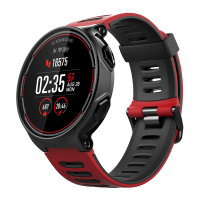
Details product name, screen size, weight, connectivity, battery, and water resistance.
Explains the function of Confirm, Return, Up, and Down keys for device navigation and control.
Instructions on how to connect the watch to a power source via USB.
Guide on obtaining the COROS App via QR code or app stores.
Steps to connect the PACE watch to a smartphone via Bluetooth.
Tips for ensuring accurate heart rate readings by fastening the watch band correctly.
Information on the watch's 5 ATM water resistance rating and usage precautions.
How GPS turns on automatically for outdoor activities and best practices.
Steps for initial calibration of altitude and geomagnetic sensors for accuracy.
Instructions on connecting Bluetooth or ANT+ enabled external sensors.
Recommendations for cleaning, drying, and maintaining the watch and charging port.
Notes on physical damage to the band not being covered by warranty.
Covers medical warnings, data security, privacy, and battery safety precautions.
Details compliance with FCC rules for digital devices and potential interference.
 General
| Display Type | LCD |
|---|---|
| Resolution | 240 x 240 pixels |
| Heart Rate Monitor | Yes |
| Connectivity | Bluetooth |
| Compatibility | iOS, Android |
| Notifications | Yes |
| Display Size | 1.2 inch |
| Weight | 48 g |
| GPS | GPS |
| Activity Tracking | Steps, distance, calories, sleep |
| Water Resistance | 5 ATM |

 To Next Page