
 Need help?
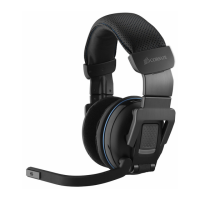
Do you have a question about the Corsair VENGEANCE 2100 and is the answer not in the manual?
Connect the wireless USB adapter to your PC or use the extension cable for better reception.
Fully charge the wireless headset before first use using the USB charging cable.
Connect the headset to establish a wireless link, indicated by blinking and solid blue lights.
Download and install the Vengeance 2100 Application Software for enhanced features.
Adjust headband and volume for comfort and optimal audio experience.
Provides advice on optimal wireless performance, battery life, and audio settings.
 General
| Type | Wireless |
|---|---|
| Headset Type | Over-ear |
| Driver Size | 50 mm |
| Frequency Response | 20 Hz - 20 kHz |
| Battery Life | Up to 10 hours |
| Microphone | Yes |
| Impedance | 32 Ohms |
| Surround Sound | 7.1 Virtual Surround |
| Microphone Frequency Response | 100 Hz - 10 kHz |
| Microphone Sensitivity | -40 dB |
| Connection | USB |
| Microphone Type | Noise-cancelling |
| Compatibility | PC |



 To Next Page