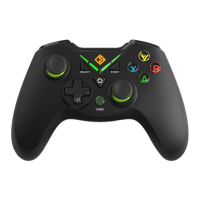
CHANGE MODE
ABXY LED AND V LED SWITCH
LEFT JOYSTICK AND D-PAD SWITCH
DEVICE CONNECTION
Press the HOME key for more than 5 seconds: X-input and Direct input.
Press L3 + back change joystick and D-pad
1. Press X + Back button to turn o the ABXY LED , and the press again
to turn on LED.
2. Press A + Back button to turn o the V LED , and the press again to
turn on LED.
Connect the gamepad with the PC using the wireless dongle. Make sure
there is no obstruction between the gamepad and the dongle for the
best connection. Use the USB Extension cable for best results.
NOTE:
1. You do not need to change the mode while connecting the gamepad
to android and PS3.
2. Gamepad will connect to Windows as X-input automatically.
3. If any diculty in connecting the gamepad to Windows, please recon-
nect the gamepad.



 To Next Page