EasyManua.ls Logo

Cosmic Byte C3070W - User Manual

Cosmic Byte C3070W
8 pages
Print Icon
To Next Page IconTo Next Page
Loading...
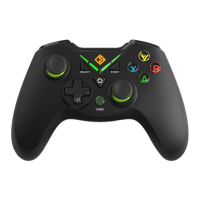
C3070W 2.4G Wireless Gamepad
SPECIFICATIONS:
Integrated Dual Mode: X-input and Direct-input for greater games compatibility
Wireless 2.4GHz technology with a range of up to 8 meters
Lithium Polymer 600mAh battery for playing up to 12 hours in a row
Charging time 2 to 3 hours
Eccentric 360˚ analog sticks for more comfort
Ultra-precise eight-way D Cross
Double triggers and analog bumpers
12 numeric buttons, including [Home], [Start], [Select]…
Backlit Action Button, [A], [B], [X] [Y]
Special “Rapid Firewith [Turbo] mode
Dual vibration motors for maximum Games thrill
Compatibility: PlayStation 3, Android and Windows XP above
LED indicators (connection charge, discharge…)
Comfortable rubber body
Nano USB receiver
OTG Converter for Android Phone/Tablet (support OTG function)
Length of charging cable:1m ±5cm
Dimensions:158mm*103mm*69mm
Weight: 190g ±10g
COMPATIBILITY:
The controller is compatible with games running with Xinput or Dinput Mode. The controller may
not vibrate with some games, as the game may not support vibration
POWER, BATTERY, STANDBY
Power On/Off:
The back of the gamepad has a Power On/Off switch.
CHARGING THE BATTERY:
When the controller is running out of power, the indicator light blinks quickly, in that case, you need
charge the controller.
Question and Answer IconNeed help?

Do you have a question about the Cosmic Byte C3070W and is the answer not in the manual?

Summary

Product Specifications

Controller Compatibility

Power, Battery, and Standby

Charging the Battery

Installation and Use

Switching Input Modes (DInput;XInput)

Instructions for switching between DInput and XInput modes using the controller's Home button.

Turbo Mode Functionality

Activating and Deactivating Turbo Mode

Steps to enable and disable the Turbo mode by using the TURBO and selected action buttons.

Troubleshooting

Gamepad Connection Issues

Common reasons and solutions for the gamepad not working on a computer.

Game Compatibility Problems

Troubleshooting steps if the game does not recognize or support the gamepad.

Troubleshooting Common Issues

Vibration Not Working

Diagnosing and resolving issues where game vibration is not functioning.

Controller Not Responding

Basic checks for a non-functional controller, including switch position and charge.

Connecting to PC

Required Configuration and Driver Installation

Details on PC connection requirements, including OS, USB port, and driver installation for Windows XP.

Connecting to Other Systems

Connecting to PlayStation 3

Steps to connect the gamepad to a PS3 console using the USB receiver.

Connecting to Android Devices

Guide for connecting the gamepad to Android smartphones, tablets, or TVs via OTG.

Warnings and Warranty

Safety Instructions

Important safety instructions regarding device handling, liquid exposure, and repairs.

Safety Precautions

General Safety and Cable Handling

Guidelines for preventing asphyxiation risks, cable tripping, and damage to power cables.

Warranty Information

Environmental Compliance

CE Declaration and WEEE

Information on CE declaration of compliance and Waste Electrical and Electronic Equipment (WEEE) disposal.

Recycling and RoHS Compliance

Details on product recyclability (Moebius Strip) and RoHS restrictions on hazardous substances.

Cosmic Byte C3070W Specifications

General IconGeneral
BrandCosmic Byte
ModelC3070W
CategoryVideo Game Controller
LanguageEnglish

Related product manuals