15
功能介绍
Features
功能介绍
Channel Scanning
Press the [Menu] key twice to enter the channel scanning menu, press
the [+] or [-] key to start/stop channel scanning, and the speaker will
give a voice prompt "Scan on" or "Scan o".During scanning, the digital
radio scans the channels in the list and the current main channel.
When any channel in the scan list is transmitting a signal, it will stay
on that channel after scanning the signal. If press the [+] key again will
skip the current channel and continue scanning. When scanning stop,
if the radio is not operated for 3 seconds or [PTT] key is pressed, it will
exit the menu mode.
Setting High/Low Power
Press the [Menu] key thrice to enter high/low power setting, and press
[+] or [-] key again to switch high/low power. If the radio is not operated
for 3 seconds or [PTT] key is pressed, it will exit the menu mode.
·
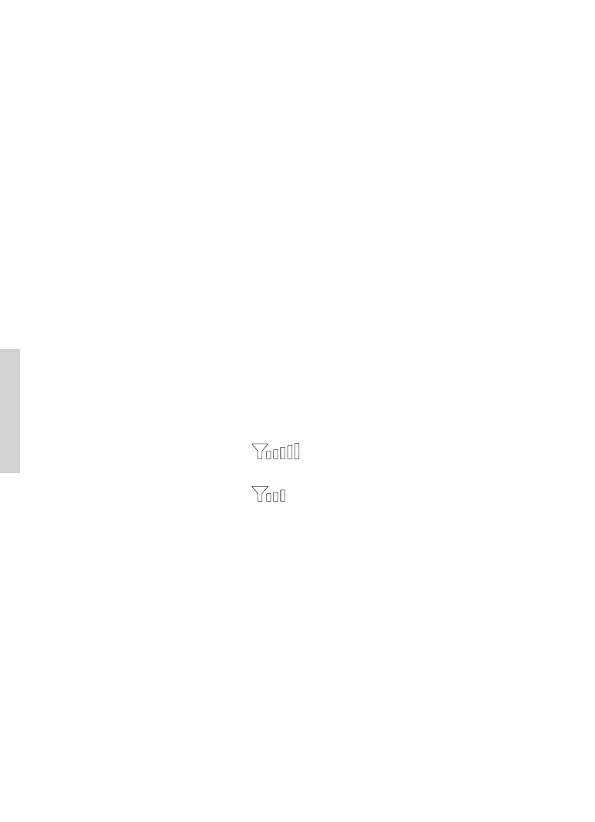
When transmitting at high power, the screen will display 5 grids of
signal, as shown in gure:
·
When transmitting at low power, the screen will display 3 grids of
signal, as shown in gure:
TOT (Time out Timer) Function
In order to prevent some users from occupying the same channel for a
long time, users can set to enable the TOT function. When the user's
continuous transmission time on the current channel reaches the TOT
duration, the radio will stop transmitting and the speaker will give a
time-limit prompt tone. You can set the time out timer via programming
software. By default is 60 seconds. When OFF is selected, user can
transmit continuously.
Features


 To Next Page