10 11
3
ARMING & DISARMING YOUR SYSTEM
You can arm and disarm your system using your Touchscreen, Cox-installed keypads or remote key fobs.
You can also arm and disarm your system through the Subscriber Portal and mobile app.
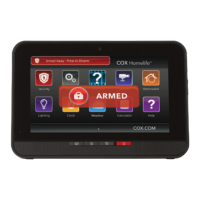
THE TOUCHSCREEN
• To arm your system, press the Security
App
• Select Arm Away , Arm Stay or Arm Night mode
• Enter your 4-digit keypad code — the countdown to arming (exit delay) will begin
• To cancel arming, enter your keypad code
• To disarm, press the Security App and enter your 4-digit keypad code
BYPASSING ZONES ON THE TOUCHSCREEN
All zones must be cleared, bypassed or trouble acknowledged before arming.
• During the arming process, select the zones you wish to bypass
• Temporarily bypass zones by touching the Turn Zone Off button next to the desired zone
• Enter your keypad code to confirm and continue the arming process
Note: Bypassed zones will return to their “on” state each time your system is disarmed.
KEYPAD (Cox Installed)
• To arm your system, enter your keypad code and press the Arm Away
or the Arm Stay button > the Unlock button turns red for 3 seconds
• To disarm your system, enter a valid keypad code and press the Unlock button
EXTENDED RANGE KEY FOB
• To Arm Away, press the Lock button once for 1.5 seconds > LED fl ashes red, then lights red
• To Arm Stay, press the Lock button once for 1 second, release the button, then press
again for 2 seconds > LED fl ashes amber, then lights red
• To disarm, press the Unlock button for 2 seconds > LED fl ashes green, then lights green
• Press and hold for 2 seconds to activate an audible panic alarm
GUEST KEY FOB
• To arm, press and hold the Arm Away or Arm Stay button for 2 seconds > LED
fl ashes red, then lights red
• To disarm, press and hold the Unlock button for 2 seconds before entering
the home > LED fl ashes green, then lights green
• Press to check system status > red indicates armed, green indicates
disarmed and amber indicates not ready to be armed
• Press to activate an audible panic alarm


 To Next Page
 Loading...