7
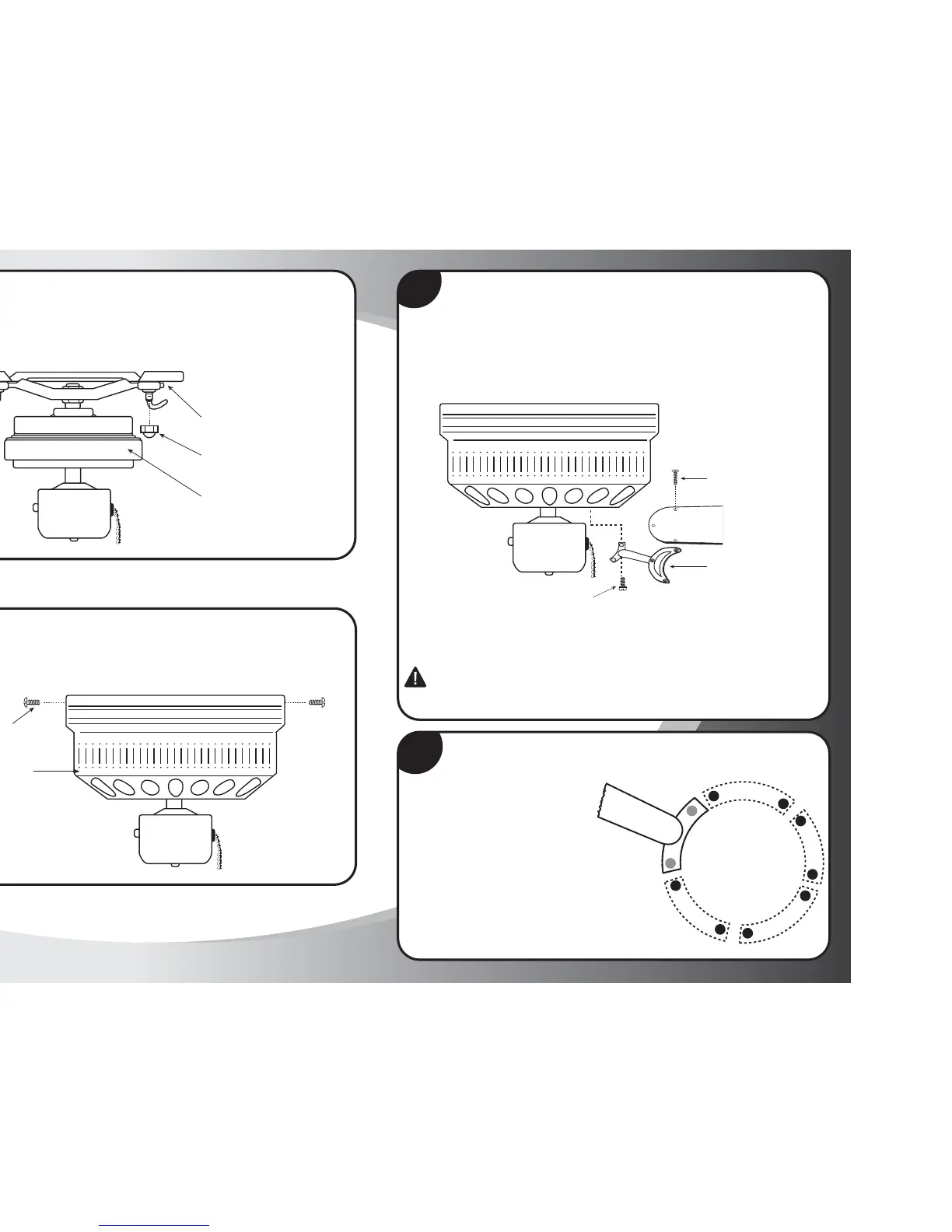
Step 7
Attach fan motor/mounting bracket (#2) to the mounting plate (#1) using
the nuts for mounting plate (S5). Note: Tighten only until the nut and bolt
are even.
Mounting Plate (#1)
Fan Motor/Mounting Bracket (#2)
Nuts for Mounting Plate (S5)
8
Step 8
Lift the outer housing (#3) onto the mounting plate (#1) and secure with
outer housing screws (S2).
Outer Housing (#3)
Outer Housing
Screws (S2)
9
Step 9
For blade assembly, position blade holder (#4) and blade (#5) so that all
screw holes are aligned (as shown in figure below). Using blade screws (S4),
insert through top of blade holder, through blade, and into blade ornament.
Tighten securely.
CAUTION:
Install blade holders to motor only after motor installation is complete. This will
prevent damage to the blade holders which have been carefully balanced. Never hold
or lift fan by the blades or blade arms. IMPORTANT: Remove rubber cushions,
saving motor screws for installation.
Blade Holder (#4)
Blade (#5)
Blade Screws (S4)
10
Step 10
5 Blade Installation
Remove rubber cushions, saving
motor screws for blade
installation. Using motor screws
(S7) provided, line up holes from
the blade arm with the holes in the motor
housing. Tighten screws securely.
Motor Screws (S7)



 To Next Page