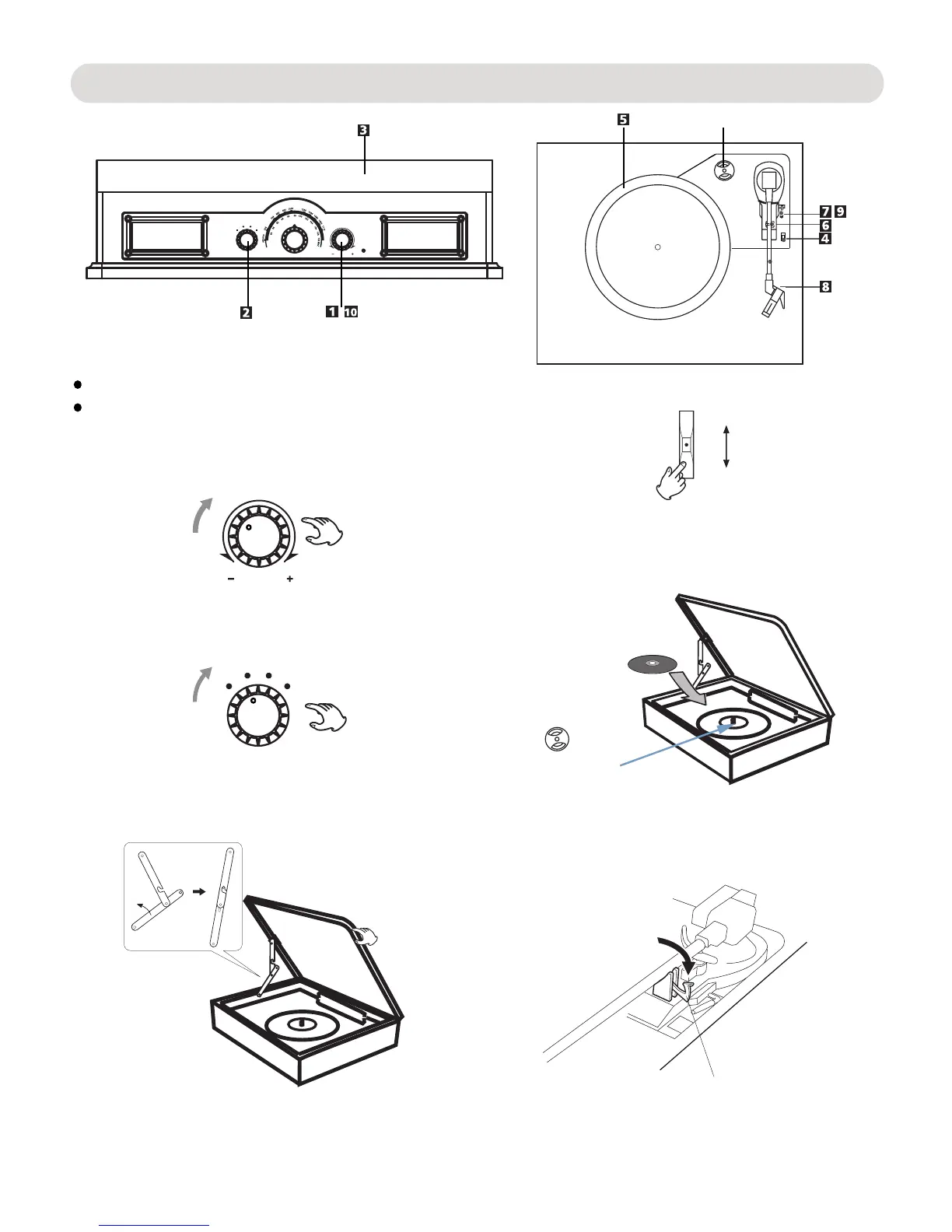
Listening to a Record
If playing the small size 45 rpm record, insert the
clip
45 RPM adaptor
Step 1
Step 2
45 RPM Adapter
F
M
A
T
M
B
VOL UME
U
X
/
A
O
N
O
H
P
NOTE:
1. Turn the VOLUME Knob clockwise until a sound "click" is
heard to turn on the unit, the indicator will light up.
VOLUME
F
M
A
T
M
B
U
X
/
A
O
N
O
H
P
2. Turn the function selector to the "PHONO/AUX" position.
3. Open the cover.
4. Select the speed.
33
45
78
5. Put the record on the turntable.
supplied adaptor to the center spindle before placing
the record.
6. Unlock the clip to release the tone arm as the figure
below.
Before use, make sure there is no 3.5mm audio cable
Before use, take out the stylus guard(white plastic cover).
plugged in the AUX jack on rear of the unit.
8


 To Next Page