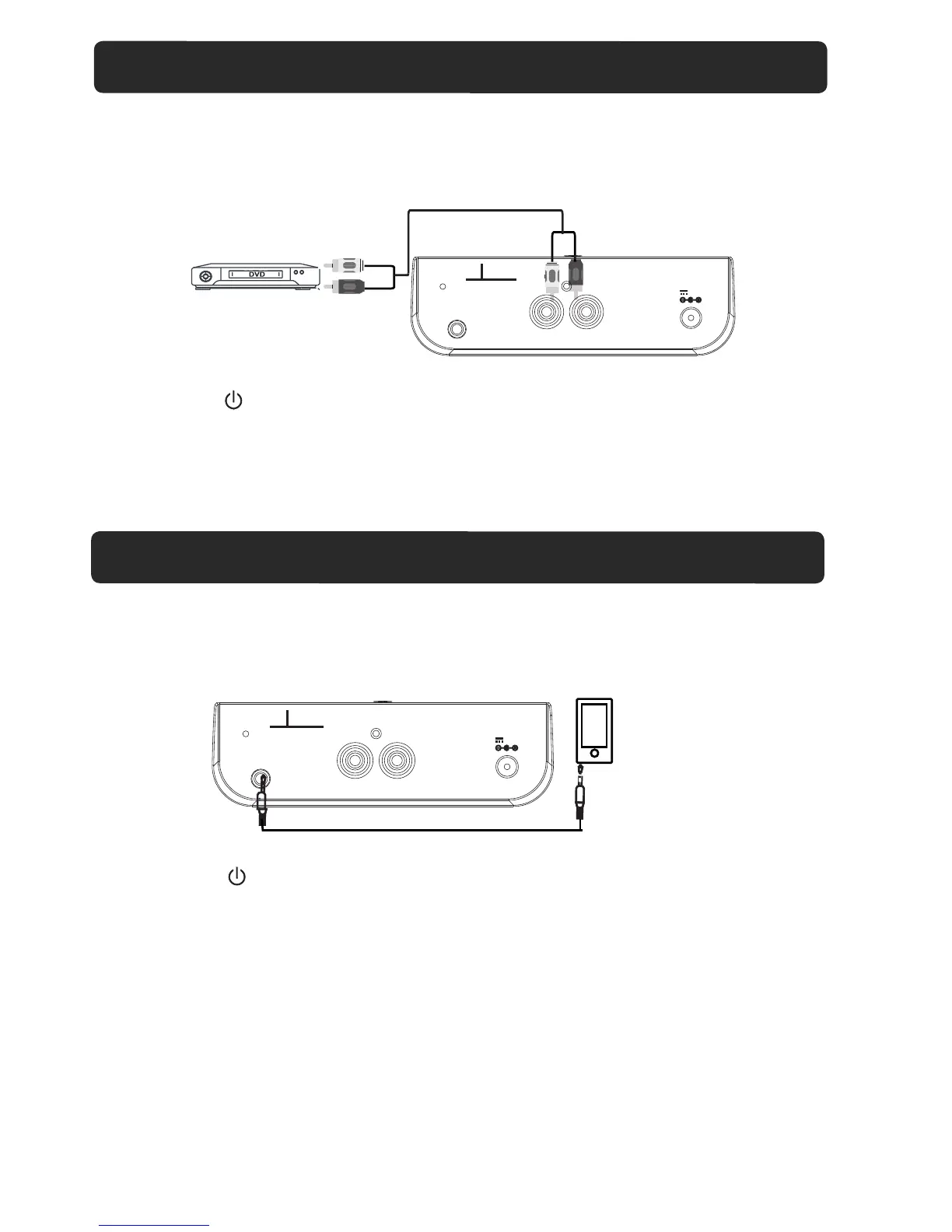
1. Connect the Headphone/Earphone; Line out jacks from the external audio player
(such like MP3 player; Discman … etc) to the AUX 2 jack on the rear of unit
by the supplied Audio Connection Cable as the figure below:
Audio
Player
To Phone Jack
2. Connect the unit to the power as previous procedures.
4. Press the SOURCE button repeatedly until " AUX 2" appear on display.
5. Power on the connected external player and start playback music as usual.
UX 2
DVD
1. Connect the Aux out jacks from the external audio player (such like TV, DVD player,
VCR …etc.) to the AUX 1 jacks on the rear of unit by the supplied RCA Connection
Cable as the figure below:
2. Connect the Sound Bar to the power as previous procedures.
3. Press the ( ) Power button to power on the unit.
4. Press the SOURCE button repeatedly until " AUX 1" appear on display.
5. Power on the connected external player and start playback music as usual.
red
white
L
R
AUX 2
ANT
AUX 1
DC IN
DC 16V, 3A
L
R
AUX 2
ANT
AUX 1
DC IN
DC 16V, 3A
11
AUX 1 : LISTEN TO TV/DVD/VCR/DVR
AUX 2 : LISTEN TO EXTERNAL AUDIO DEVICES
To Audio Out Jacks
3. Press the ( ) Power button to power on the unit.



 To Next Page