To Next Page
P
Phyllis BellJul 31, 2025
Why won't my Craig cma3561 power on?
- MMarco HallAug 1, 2025
If your Craig Speakers won’t power on, it is likely that the built-in battery is fully consumed. To resolve this, recharge the unit.

Why won't my Craig cma3561 power on?
If your Craig Speakers won’t power on, it is likely that the built-in battery is fully consumed. To resolve this, recharge the unit.
What to do if my Craig cma3561 have no sound or the sound is weak?
If your Craig Speakers produce no sound or the sound is weak, there are a couple of things you can check: * Ensure that the speaker volume isn't set too low. Press and hold the >/V + Button to increase the volume. * Also, verify that the volume level on your paired Bluetooth device is adequately high. Increase the volume on that device as well.
Details compliance with Class B digital device limits and potential interference.
Alerts about potential radio frequency energy generation and modification risks.
Guide on how to charge the built-in Li-ion battery using USB.
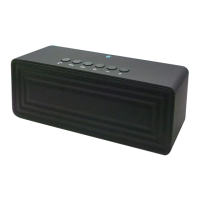
Identifies and lists the physical buttons, ports, and indicators on the unit.
Steps for pairing the speaker with external Bluetooth devices.
How to play music, adjust volume, skip tracks, and handle calls.
Instructions for connecting external audio players via the LINE IN jack.
Solutions for common issues like no power or no sound.
Details technical specs like BT range, audio power, and impedance.
Lists all items included in the product package.
Outlines the product warranty terms, conditions, and service contact.
 General
| Brand | Craig |
|---|---|
| Model | CMA3561 |
| Category | Speakers |
| Connectivity | Bluetooth |
| Power Source | Battery |
| Number of Batteries | 1 |
| Power Output | 5W |
| Speaker Type | Portable |
| Features | AUX Input |
| Battery Type | Lithium-ion |