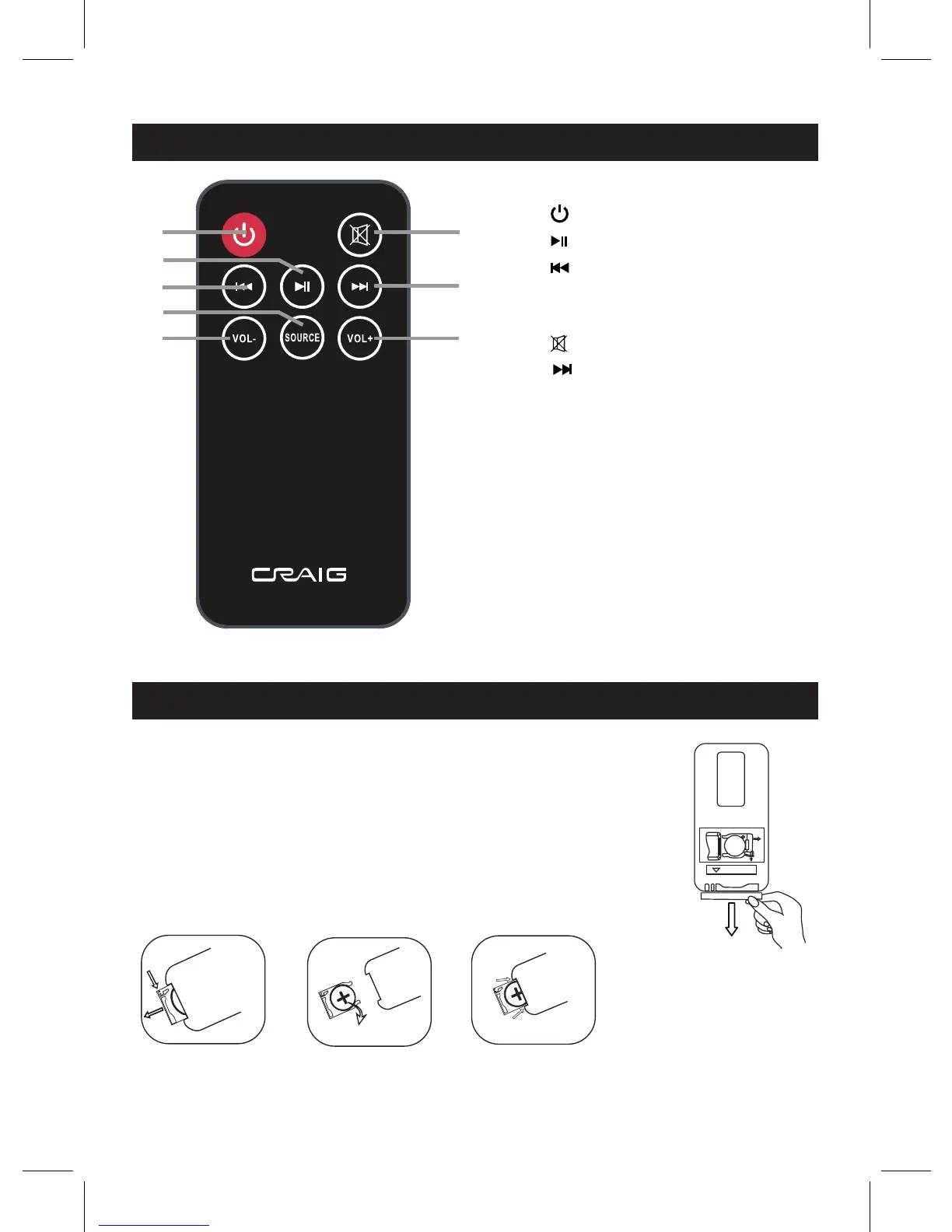
Remove and discard the insulation film as illustrated on the right.
7
LOCATION OF CONTROLS - REMOTE CONTROL
BUTTON CELL INSTALLATION - REMOTE CONTROL
1
2
3
4
5
6
7
8
6. (Mute) Button
RELEASE
PUS H
OPE N
R202 5
C
+
SN
Fig.1
Fig.2
Fig.3
1. (Standby On/Off) Button
2. (Play/Pause) Button
3. (Skip Backward) Button
4. SOURCE Button
5. VOL- (Volume Down) Button
7. (Skip Forward) Button
8. VOL+ (Volume Up) Button
First Time Use:
If the button cell is drained, replace it by a new one as below:
1. Push and slide out the battery holder as Fig.1 below.
2. Replace the button cell with a new CR2025 button cell as the polarity
markings on the rear of the Remote Control as Fig.2 below.
3. Close the battery hold as Fig.3 below.



 To Next Page