• Place the E-dictionary in the protective cover
• Switch off the power supply once it is fully
charged to prevent over charging the battery
• Avoid placing the device in high temperatures
• Avoid contact with water
• Avoid dropping the device from higher places
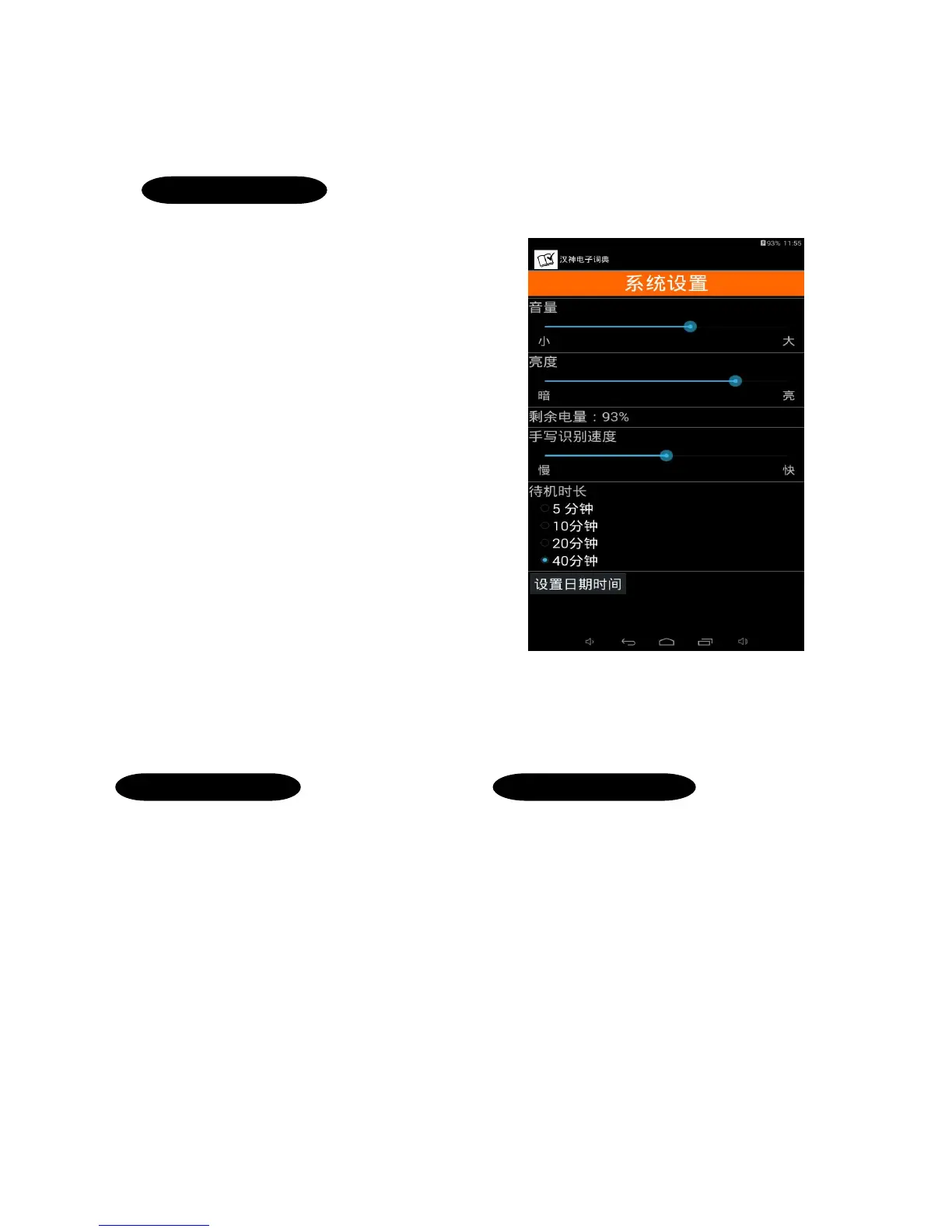
-Volume adjustment
Adjust volume settings, as it is an examination model,
there are no inbuilt speakers. Students can only listen to
pronunciations by plugging in earphones.
You may connect to a speaker at home to listen to the
pronunciations.
-Brightness settings
Adjusting the display brightness
The higher your brightness is set, the more power loss
-Battery Percentage
Displays the battery percentage of your dictionary
-Handwriting speed recognition
This indicates the amount of time in between the
finger/stylus tip leaving the touch screen and the device
recognising the character. The default setting is 0.5
seconds.
-Standby time
You can set the device’s standby time here
-Date and Time Settings
Adjust the date and time settings here
System Settings
E-dictionary Care
•Fully charge the dictionary a day before examination
•Turn on the dictionary once inside the examination hall
•After turning on, tap the power button to enter sleep
mode
•When using, tap on the power button once to wake the
device instantly
•You can set the standby duration to as long as 20
minutes
Examination Preparation



 To Next Page